Troubleshoot your distributed upgrade
Resolve automatic system prerequisites checks issues
|
Text in CLI |
Description |
How to resolve (log data about prerequisite checks are found in /var/log/algosec-software-upgrade.log) |
||||||||||||||||||||||||||||||||||||||||||||||||||||||||||||||||||||||||||||
|---|---|---|---|---|---|---|---|---|---|---|---|---|---|---|---|---|---|---|---|---|---|---|---|---|---|---|---|---|---|---|---|---|---|---|---|---|---|---|---|---|---|---|---|---|---|---|---|---|---|---|---|---|---|---|---|---|---|---|---|---|---|---|---|---|---|---|---|---|---|---|---|---|---|---|---|---|---|---|
Machine [machine IP] does not meet the minimal hardware requirements. |
Checks system machine appliance specs: cores, memory. |
Make sure the machine meets the system requirements. See System requirements. For details, see Checking cores and memory on [machine IP] in the log. |
||||||||||||||||||||||||||||||||||||||||||||||||||||||||||||||||||||||||||||
There is less than xx MB free disk space in OS partition on node [machine IP].
Insufficient disk space. xxxMB found for installation (Less than the required 5000 MB in the OS partition on node[machine IP])
Partition (/data) on local node must have at least <required> MB free space. This includes the amount of space needed to sync the monitor data directory, plus an additional 5 GB. You currently only have <avail> MB free space. |
Checks disk space on system machine. |
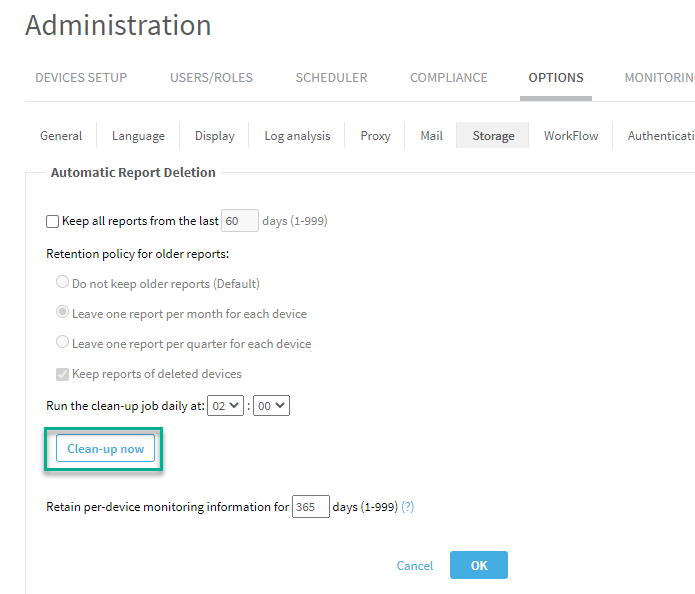
Run auto-remove to free up disk or delete old run files. To run auto-remove, in AFA Administration, go to the Options tab, Storage sub-tab, and click Clean-up now.
If the issue persists after running Clean-up now, contact AlgoSec support. |
||||||||||||||||||||||||||||||||||||||||||||||||||||||||||||||||||||||||||||
Insufficient disk speed. |
Checks source node disk speed. |
We recommend disk write speed of at least 300MB/s. Minimum allowable is 80MB/s. Contact your IT department to determine and adjust, if necessary, your node disk speed. Tip: Use the following command to check disk speed: dd if=/dev/zero of=/data/test-big-file.bin bs=786432000 count=1 oflag=dsync 2>&1 ; rm -f /data/test-big-file.bin An example of the output is: 786432000 bytes (786 MB) copied, 0.624098 s, 1.3 GB/s
Tip: If you are using an AlgoSec VM, make sure you are following VM best practices. See Best practices for your AlgoSec VMware Deployment . If you make changes, check your disk speed again to see if it has improved. Tip:If your target machine is an AlgoSec AMI, make sure you are using recommended deployment. See Deploy ASMS on AWS. |
||||||||||||||||||||||||||||||||||||||||||||||||||||||||||||||||||||||||||||
Distribution nodes machine time prerequisite check failed. |
Compares Time between system machine and distribution nodes (Remote Agent and LDUs). |
The machines can be in different time zones but they have to be at the same time relative to UTC:
|
||||||||||||||||||||||||||||||||||||||||||||||||||||||||||||||||||||||||||||
NAS is configured, but directories are not mounted.
NAS mount is disabled due to fault detected. |
Checks NAS status on Central Manager and LDUs. |
Open algosec_conf menu on the node with the NAS issue. Run option option 11 - Configure NAS. Run option 3 - Re-enable NAS mount. If issue persists on an LDU, in the algosec_conf menu, run option 15 - Distributed Architecture configuration. If problem persists, contact AlgoSec support. |
||||||||||||||||||||||||||||||||||||||||||||||||||||||||||||||||||||||||||||
NAS is suspended |
Open algosec_conf menu on the node with the NAS issue. Run option option 11 - Configure NAS. Run option 3 - Re-enable NAS mount. If issue persists on an LDU, in the algosec_conf menu, run option 15 - Distributed Architecture configuration. If problem persists, contact AlgoSec support. |
|||||||||||||||||||||||||||||||||||||||||||||||||||||||||||||||||||||||||||||
|
Checks status of services. |
 Try to restart the services. Run for each service: Try to restart the services. Run for each service:
algosec_test_service -n <SYSTEM SERVICE NAME> -f for example, System service names to use when restarting a service:
If services do not restart, contact AlgoSec support. |
|||||||||||||||||||||||||||||||||||||||||||||||||||||||||||||||||||||||||||||
Node: 10.20.8.95 * The path /home/afa/algosec should be non-broken symlink |
Checks essential redirect links. | Contact AlgoSec support. | ||||||||||||||||||||||||||||||||||||||||||||||||||||||||||||||||||||||||||||
Validation of upgrade files xxx failed. The files may be corrupted. Download the files again. |
Checks for corrupted run files. | Download run files again. | ||||||||||||||||||||||||||||||||||||||||||||||||||||||||||||||||||||||||||||
Distribution Architecture is not configured properly. |
Checks for improperly configured distribution nodes. | In the algosec_conf menu, run option 15 - Distributed Architecture configuration. | ||||||||||||||||||||||||||||||||||||||||||||||||||||||||||||||||||||||||||||
PostgreSQL is not synced between Cluster machine ([machine IP]) and the Primary machine ([machine IP]). |
Checks PostgreSQL sync status between cluster machine and Primary. | In the algosec_conf menu, go to option 13 - HA/DR Setup. Select 1 - View cluster status details. | ||||||||||||||||||||||||||||||||||||||||||||||||||||||||||||||||||||||||||||
Inconsistencies found between the devices list and database records. |
Checks for database inconsistencies. |
To fix the inconsistency, see procedure in the knowledge base article: www.algosec.com/r/a32.00/42845777. |
||||||||||||||||||||||||||||||||||||||||||||||||||||||||||||||||||||||||||||
Excessive RPM removal check failed. |
Checks for RPMs that need to be removed. |
|
||||||||||||||||||||||||||||||||||||||||||||||||||||||||||||||||||||||||||||
Failed to get HA dependent nodes, make sure that the ms-hadr service is up. |
Checks that remote HA nodes are responsive. |
In the algosec_conf menu of the HA Remote Agent, go to option 13 - HA/DR Setup. Select 1 - View cluster status details. By doing this you restart the service. Make sure that cluster is now synced. |
||||||||||||||||||||||||||||||||||||||||||||||||||||||||||||||||||||||||||||
You are using a custom SSO module: <name of SSO module> This implementation may be incompatible with the version you're upgrading to. We recommend that you contact AlgoSec support before continuing with the upgrade. |
Checks custom SSO module. | Contact AlgoSec support. | ||||||||||||||||||||||||||||||||||||||||||||||||||||||||||||||||||||||||||||
Communication on ports TCP/9000--9010 is blocked by firewalls between the CM and LDUs and between LDUs and LDUs. We recommend that you contact your IT department to allow traffic (bi-directional) on these firewalls before continuing with the upgrade. |
Checks required communication with LDUs |
Communication between the CM and LDUs, and between LDUs and LDUs, is encrypted and utilizes ports TCP/9001--9010.* Ask your IT department to allow traffic on these firewall(s) for these ports (bi-directional). *This is applicable for up to 5 LDUs. If you have a requirement for more than 5 LDUs, contact AlgoSec support for further assistance. |
These additional prerequisites will only run in the major upgrade to A33.00 including the update to the Rocky Linux 8 OS:
Incorrect network configuration file detected in /etc/sysconfig/network-scripts. To fix the issues, see https://algopedia.algosec.com/v1/docs/a33-upgrade-networkprerequisite |
This indicates that there is a misnamed configuration file. | To fix the issue, see this kb article. |
Run File Discrepancy Detected. |
Indicates that /root/AlgoSec_Upgrade/ is missing or contains too many run files. |
To fix the issue, make sure that /root/AlgoSec_Upgrade/ contains only these run files for A33.00:
|
Upgrade stopped: The active kernel is outdated. |
Indicates that newest kernel is not currently running on the machine <node IP> | Reboot machine <node IP> to apply the newest installed kernel and retry the upgrade. |
Detected an expired third-party ssl certificate. |
Indicates an expired third-party ssl certificate |
Recommended: Regenerate a valid third-party SSL certificate and retry the upgrade. Alternatively: Proceed with the upgrade to automatically generate a self-signed certificate. After the upgrade, regenerate a valid third-party SSL certificate. Follow steps in How to install .cer ssl certificate. |
Installation cannot proceed. Install the latest hotfix of A32.60 before proceeding. |
Checks that you are upgrading from the required ASMS A32.60 latest build (A32.60.310-143 or above) | First upgrade the product to ASMS A32.60 latest build (A32.60.310-143 or above) |
Compatibility issues were found in FireFlow customizations. |
Checks if there are FireFlow customizations issues. |
For more information, see: Ensure compatibility of FireFlow customizations |
Failed to create HTTP loopback server. There are HTTP/HTTPS proxy settings blocking the connection. Follow instructions in https://algopedia.algosec.com/v1/docs/a3300-prerequisites-failed-to-create-http-loopback-server# |
Checks if any machine settings have a proxy that prevents HTTP loopback. | Follow instructions in this AlgoPedia article. |
Resolve upgrade failures
-
If your distributed upgrade fails for any reason, the system displays an error, as well as the location of specific log files.
-
The central upgrade log file is located at: /var/log/algosec-software-upgrade.log
Log files indicate the source of the issues and ways to fix them.
-
-
If you have a distributed system and only some nodes failed, the system will show a summary for all the nodes and their status. You can select the nodes you want to reinstall, or rerun the entire upgrade from scratch. Select the option that works best for you and run through the CLI process as prompted and described above.
-
For HA/DR Suspend/Resume Cluster errors: Go to /var/log/algosec_hadr/ms-hadr.log and check the log for errors.
-
For run file errors: Check the log displayed in the error message for details on why the upgrade failed.
Contact AlgoSec Support for additional assistance, and send copies of all supporting log information.


