Offboard Azure subscriptions from ACE
You can offboard Azure subscriptions from ACE with the following methods:
 From the Azure Cloudshell (for subscriptions onboarded using the script/no script methods)
Do the following:
For offboarding all subscriptions:
-
Delete the service principal associated with the AlgoSec Cloud Enterprise application. This action removes the application's access to your tenant: From the Azure Cloudshell run the following command:
Note: You need proper permissions to run "az ad sp delete".
az ad sp delete --id 'f1764d38-8bca-497f-94ae-2ccec598107d'
Note: Subscriptions are automatically removed from ACE during the next scheduled sync. After that, the synchronization process is automatically discontinued.
For more details on using Azure Cloudshell to offboard a subscription, see az ad sp delete.
For offboarding individual subscriptions:
From the Azure Cloudshell remove permissions for the subscription(s):
Note: Removed subscriptions will automatically sync with ACE once every hour.
To offboard subscriptions that were onboarded using the API or Terraform method
Do the following:
You can remove the subscription from ACE interface or API.
To remove the subscription from the ACE interface:
-
In ACE, hover over the
 Settings icon at the bottom left of the screen. After the panel expands, click
  Onboarding. The Onboarding Management page is displayed, with a table showing details for each account defined in ACE.
 -
Select the checkbox to the left of the subscriptions(s) you want to delete. You can click on the checkbox in the column header to select all vendors.
-
Click Delete.
A confirmation window appears.
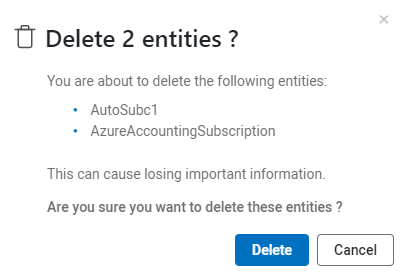
-
Click Delete again to delete the selected subscription(s).
To remove the subscription by API:
Do the following:
Go to the Delete an Azure subscription API and follow instructions to remove the subscription.
To remove the subscription by Terraform:
Do the following:
Use terraform destroy to delete all infrastructure resources and offboard from ACE.
Offboard Cloud App Analyzer CD mitigation resources
If App analyzer CD mitigation was onboarded, complete removal requires cleaning up Subscription-level artifacts.
Do the following:
-
Delete the Resource Group
-
Name: prevasio-<HASH>-resource-group
-
Action: Deleting it to remove the Function App, Storage Account, and logic container.
-
-
Remove Custom IAM Role
-
Name: Prevasio Application Role (<HASH>)
-
Action: Delete the custom role definition and its assignment to the Service Principal.
-
-
Purge the Key Vault
-
Name: prevasio-<HASH>-kv
-
Action: You must explicitly purge the Key Vault to free up the name; otherwise, re-onboarding will fail with a "Conflict" error.
-
HASH = a combination of the first 4 characters of your AlgoSec Tenant ID plus the first 4 characters of the Subscription ID.
For example: If Tenant ID == 123456789, and Subscription ID = abcdefgh, HASH = 1234abcd


