Review Account Status
The ACE OVERVIEW page enables you to more easily manage many accounts from multiple vendors. Identify the accounts to focus on and then view the relevant pages to investigate the issues.
Access the Overview page
To open the Overview page, click the  OVERVIEW icon on the left.
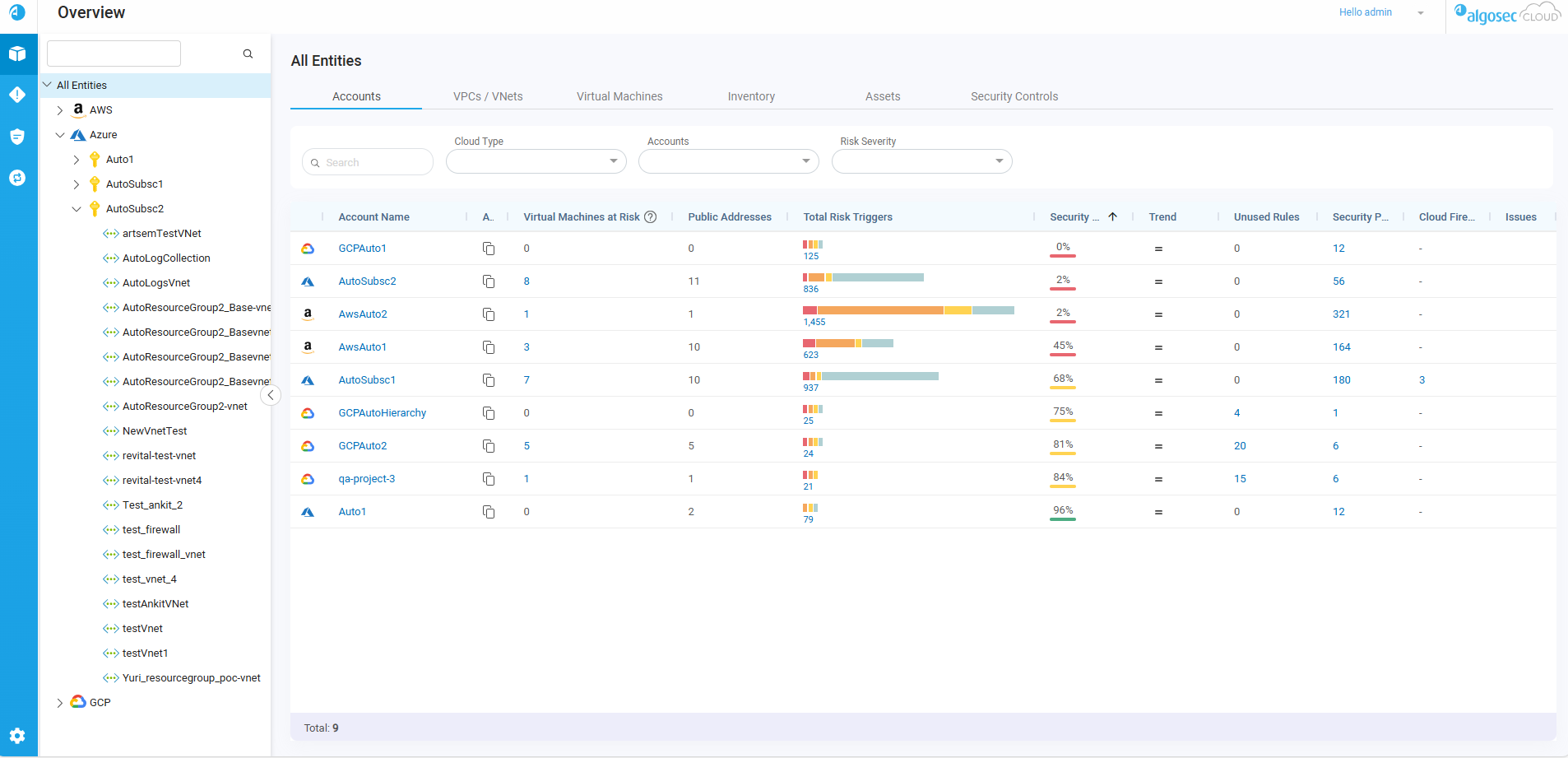
By default, the page opens on the Account summary tab and displays an overview of all accounts onboarded to ACE. To learn more about each of the tabs, see Overview page tabs.
Overview page tabs
Use the Accounts, VPCs / VNets, Virtual Machines, Inventory, Assets, and Security controls tabs in combination with the selected entity or account group in the Navigation Tree and filter options for a targeted view of the managed accounts, the protected assets, and the security controls.
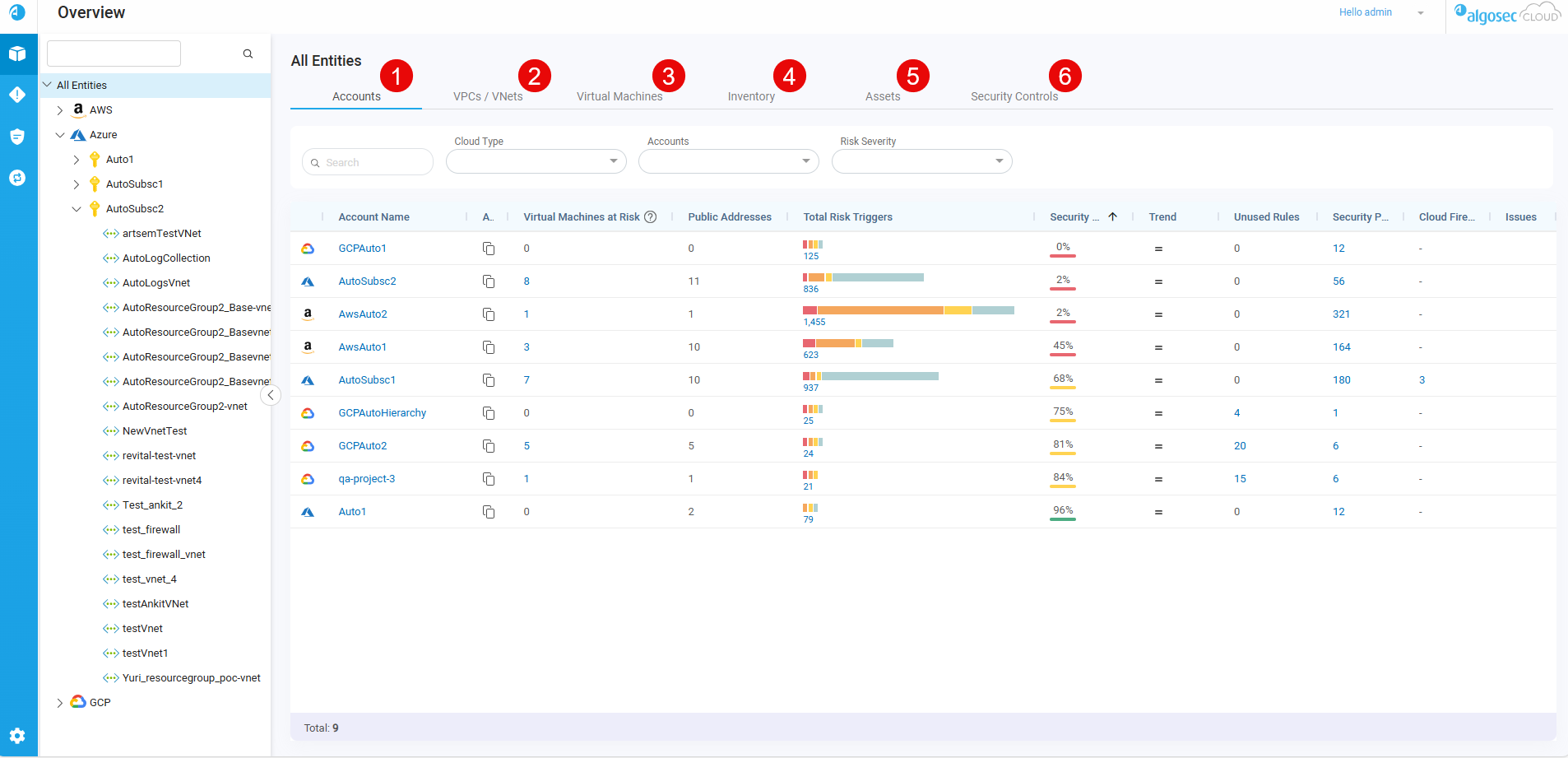
 1. The Accounts tab
The Accounts tab displays an aggregated view of accounts based on your selection in the Navigation Tree and Accounts tab search and filter options. See the table below for a description of the information available in the Accounts tab.
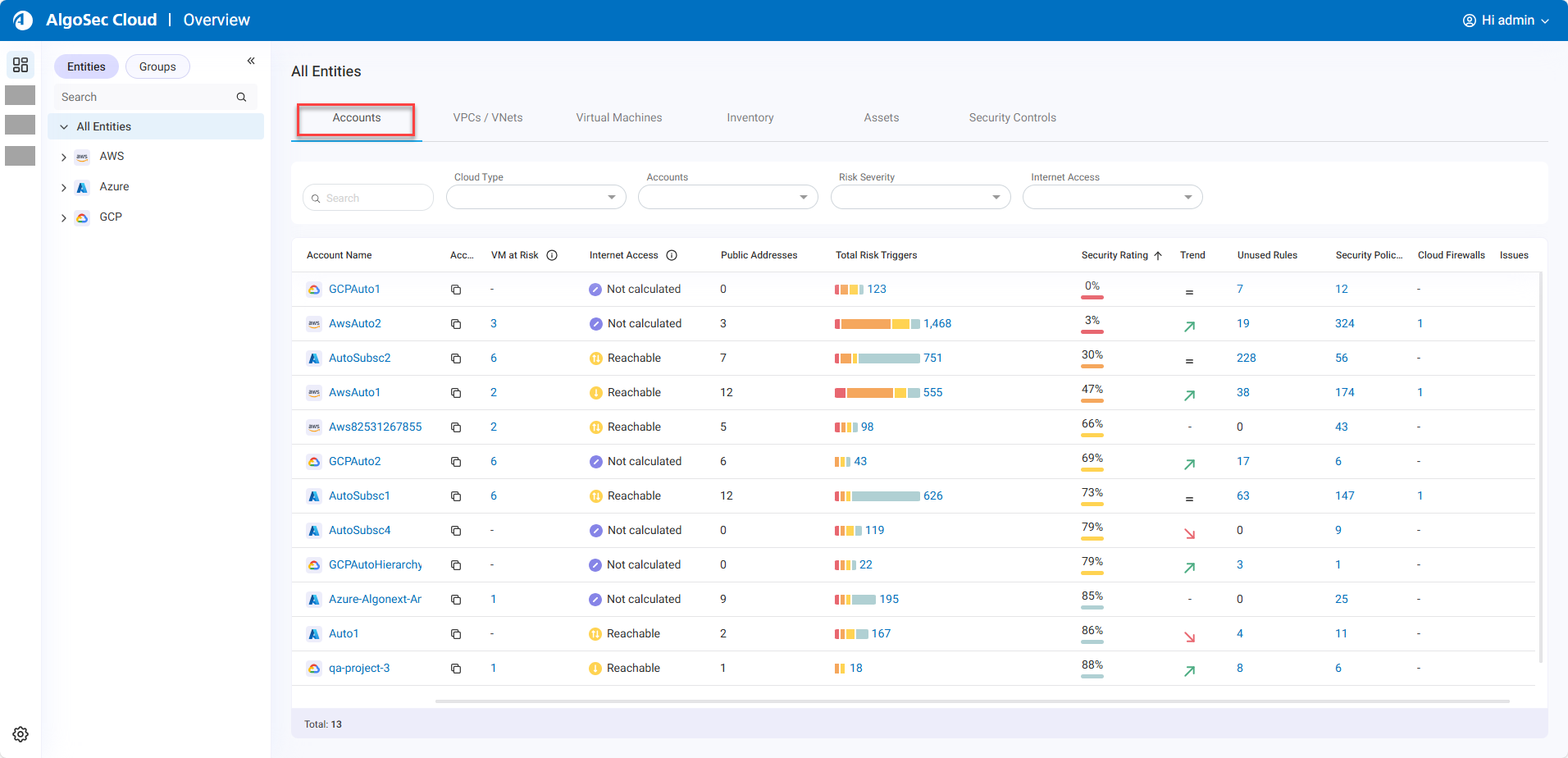
By default, the most risky accounts are listed first. To sort by a different column, click on that column name.
| Column Name | Description |
|---|---|
|
Account Name |
Displays the vendor icon (AWS, Azure, Google Cloud) and name of the account / subscription / project. Click on an Account Name to navigate to the corresponding VPCs / VNets tab. There, you can review the virtual networks that makes this account risky. |
|
Account ID |
The Account ID is the unique ID generated by the vendor that identifies the account / subscription / project. Hover over the Tip: To copy the Account ID, hover over the |
| Virtual Machines at Risk |
Displays the number of VMs configured with public IPs and which are associated with rules having critical or high risks based on the activated risk profile. Click on the number to open the Virtual Machines tab with a detailed view of the specific risky assets. |
| Internet Access |
Shows whether private subnets in the account’s VPCs/VNets have internet access. If at least one VPC/VNet has internet access, the account is classified as Reachable. For a per–VPC/VNet breakdown, click the account name to open the VPCs / VNets tab. Internet access is determined by running a Traffic Simulation Query in ASMS against all private IP addresses in each VPC/VNet. Possible values:
|
| Public Addresses |
Displays the total number of unique public IPs defined under each account / subscription / project. Hover over the number to display a tooltip with a list of the IPs.
Tip: To copy the full list of public IP addresses to the clipboard, click Note: The tooltip displays up to 25 IP addresses. If there are more, a chip shows the number of additional IP addresses. |
| Total Risk Triggers |
Displays the total number of risk triggers and categorizes them into a bar graph using distinct colors for each severity level:
█ = Critical █ = High █ = Medium █ = Low Tip: To view detailed information about risks categorized by their specific severity levels, click on the respective colors displayed on the bar graph. Alternatively, to access details regarding all risks, click on the total count. Click on the total number or one of the colors in the bar graph to view the corresponding risks on the Risks page. |
| Security Rating |
Indicates the network security compliance level of the account. For details on how the security rating is calculated, see Calculating the Security Rating. A color-coded bar beneath the rating gives a visual indication of the level of compliance as follows: █ 0-50% █ 51-84% █ 85-100% Note: In a situation where data collection was never completed, N/A is displayed. |
| Trend |
Indicates any changes over time in the security rating of the account.
Note: The trend is determined by comparing the current security rating with the rating 30 days prior. If data is unavailable, the rating from the next most recent historical day (for example, day 29) is used. |
| Unused Rules |
Displays the number of rules with no traffic logged during the configured inactivity period. Click on the number to view details about the unused rules on the Network Policies page. For details about viewing and managing unused rules see Clean Up Policies. |
|
Security Policies |
Displays the number of security policies for each account (not including policies on cloud firewalls). Click on the number to view details about the policies on the Network Policies page. |
|
Cloud Firewalls |
Displays the number of AWS Network Firewalls and Azure Native Firewalls in the account / subscription. Click on the number to view details about the policies on the Network Policies page. |
| Issues |
If an issue occurred while collecting account data, Possible issues include the following:
|
 icon to see a popup with the Account ID.
 To & From Internet: At least one VPC / VNet in the account permits some bidirectional traffic between the private subnets that are defined in the VPC / VNet and the internet.
 From Internet: At least one VPC / VNet in the account permits some traffic from the internet to the private subnets that are defined in the VPC / VNet.
 To Internet: At least one VPC / VNet in the account permits some traffic to the internet from the private subnets that are defined in the VPC / VNet.
 Not found: Of the VPCs / VNets evaluated, Traffic Simulation Query did not find internet access for any of the private subnets defined in the VPC / VNet in the account.
 Not calculated: Access to the internet was not checked for any of the VPCs / VNets in the account.
 in the column header to see a tooltip with the date and time of the most recent internet access calculation.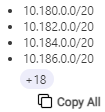

 The security rating of the account improved during the analyzed period
 The security rating of the account worsened during the analyzed period
 No change in the security rating during the analyzed period
 appears. Hover over the icon to see a tooltip explaining the cause of the issue.
Accounts tab search and filter options
Use the search and filter fields to see a targeted selection of accounts.

| Search | Search accounts using partial or whole account names or vendor IDs. |
| Cloud Type | Filter by vendor type(s) (AWS, Azure, Google Cloud). |
| Accounts | Filter by account name(s). |
| Risk Severity | Filter by risk severity (Critical, High, Medium, Low). |
| Internet Access | Filter by internet access (Reachable (to & from internet), Reachable (to internet), Reachable (from internet), Not found, Not calculated). |
Customize Columns
You can rearrange columns and toggle their visibility as needed.
Rearrange columns

Do the following:
-
Drag column headers to reorder columns.
-
(Optional) To reset the column order, click
 , located on the top right of the list of accounts, and then Reset View.
Show / Hide columns
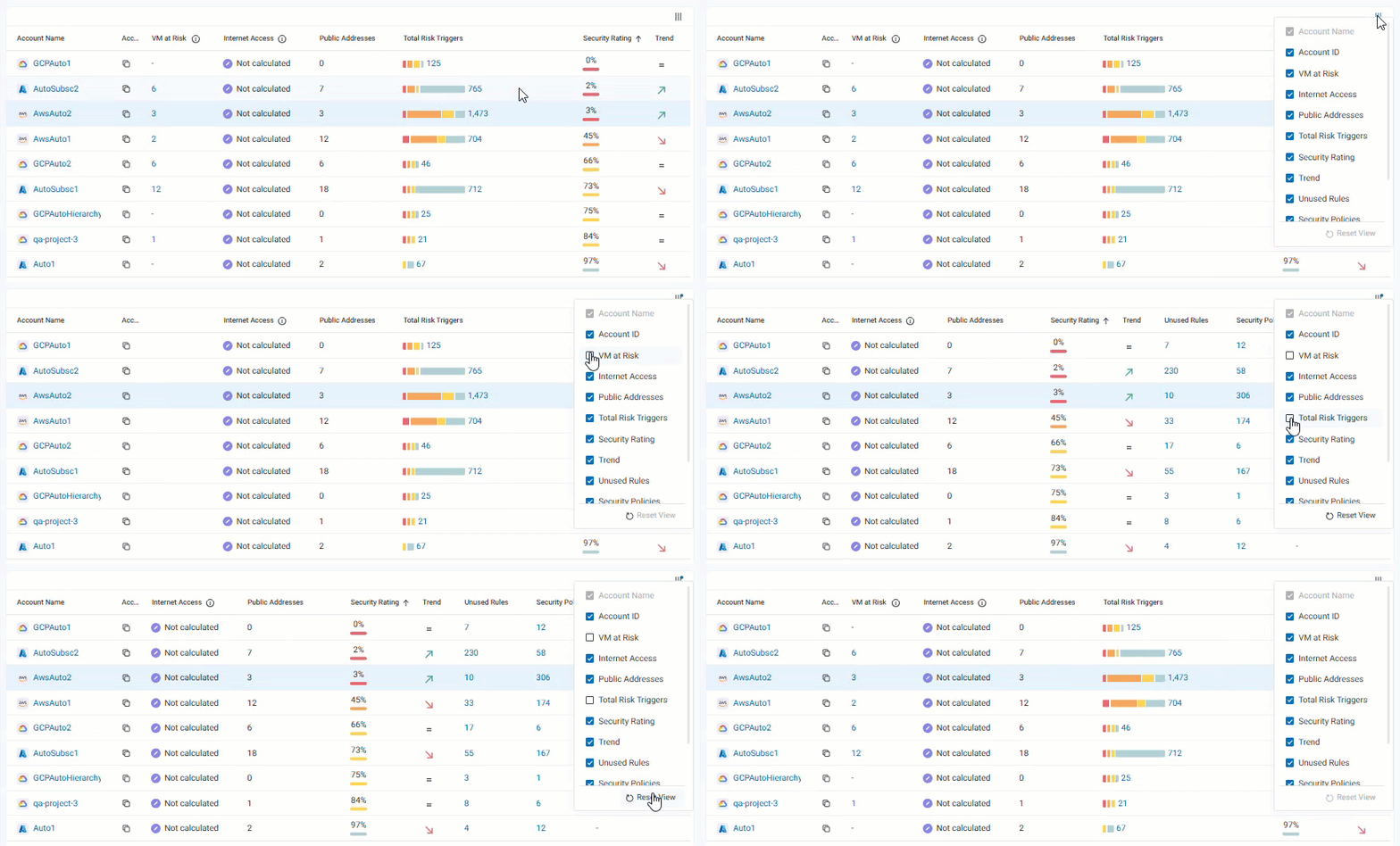
Do the following:
-
Click
, located on the top right of the list of accounts, and then select the columns to show or hide.Note: The Account Name column cannot be hidden.
-
(Optional) To reset the column visibility, click
and then Reset View.
2. The VPCs / VNets tab
The VPCs / VNets tab displays an aggregated view of VPCs and VNets based on your selection in the Navigation Tree and VPCs / VNets tab search and filter options. See the table below for a description of the information available in the VPCs / VNets tab.
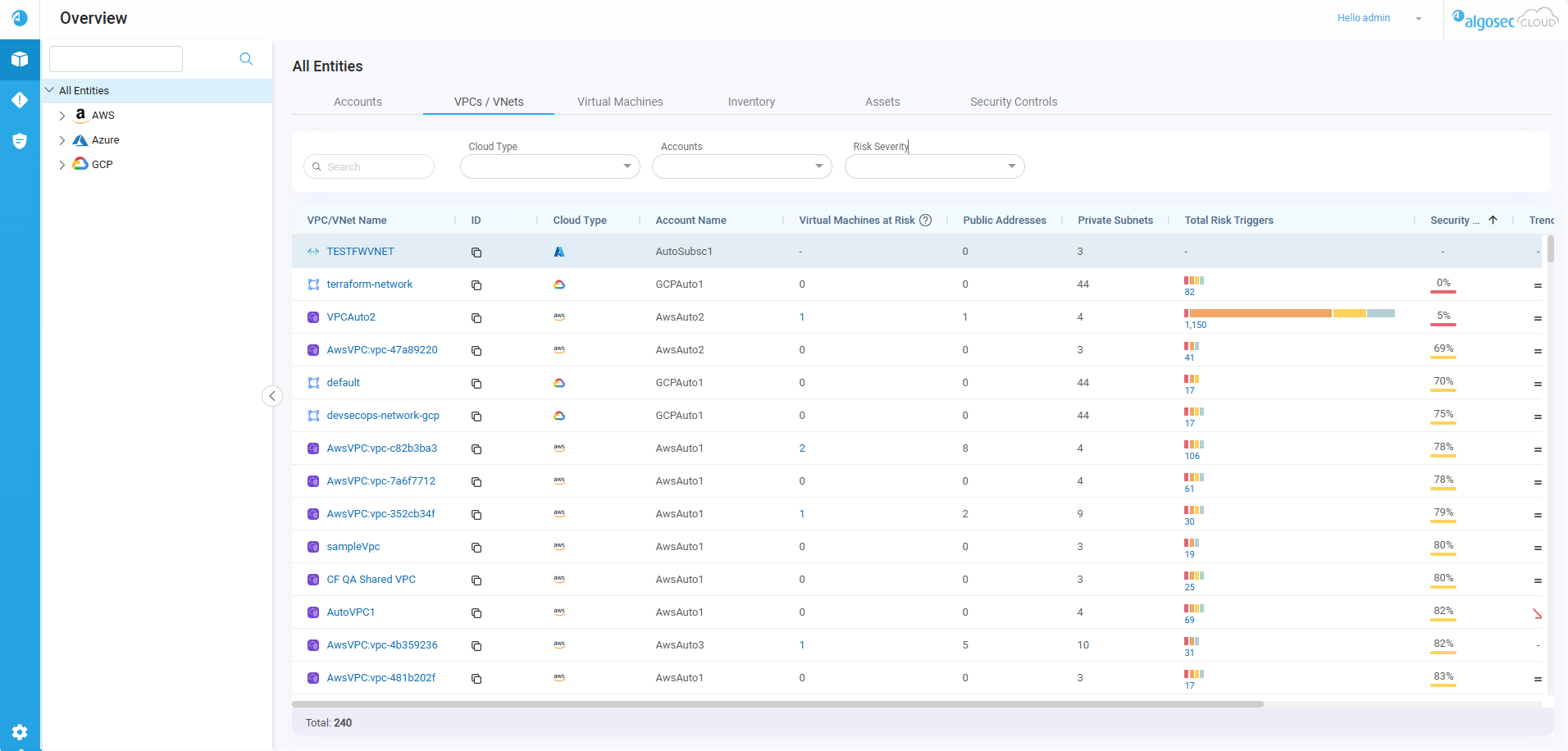
By default, the most risky VNets / VPCs are listed first. To sort by a different column, click on that column name.
| Column Name | Description |
|---|---|
| VPC / VNet Name |
Displays the VPC / VNet icon and name. |
|
ID |
The ID is the unique ID generated by the vendor that identifies the VPC / VNet. Hover over the Tip: To copy the ID, hover over the |
| Cloud Type | Displays the icon of the vendor. |
| Account Name | The name of the account where this virtual machine is located. |
| Virtual Machine at Risk |
Displays the number of virtual machines configured with public IPs and which are associated with rules having critical or high risks based on the activated risk profile. Click on the number to open the Virtual Machines tab with a detailed view of the specific risky virtual machines. |
| Internet Access |
Displays whether or not the private subnets under the VPC / VNet has access to the internet. Internet access is determined by running a Traffic Simulation Query in ASMS against all private IP addresses in each VPC/VNet. Possible values:
|
| Public Addresses |
Displays the total number of public IPs associated with all interfaces in the virtual network. Hover over the number to display a tooltip with a list of the IPs.
Tip: To copy the full list of public IP addresses to the clipboard, click Note: The tooltip displays up to 25 IP addresses. If there are more, a chip shows the number of additional IP addresses. |
| Private Subnets |
Displays the total number of private subnets associated with all interfaces in the virtual network. Hover over the number to display a tooltip with a list of the subnets. AWS and Azure display additional network information, with AWS showing CIDRs and Azure showing Address Spaces. Tip: To copy the full list of private subnets to the clipboard, click Note: The tooltip displays up to 25 private subnets. If there are more, a chip shows the number of additional private subnets. |
| Total Risk Triggers |
Displays the total number of risk triggers and categorizes them into a bar graph using distinct colors for each severity level:
█ = Critical █ = High █ = Medium █ = Low Tip: To view detailed information about risks categorized by their specific severity levels, click on the respective colors displayed on the bar graph. Alternatively, to access details regarding all risks, click on the total count. Click on the total number or one of the colors in the bar graph to view the corresponding risks on the Risks page. |
| Security Rating |
Indicates the network security compliance level of the virtual machine. For details on how the security rating is calculated, see Calculating the Security Rating. A color-coded bar beneath the rating gives a visual indication of the level of compliance as follows: █ 0-50% █ 51-84% █ 85-100% Note: In a situation where data collection was never completed, N/A is displayed. |
| Trend |
Indicates any changes over time in the security rating of the virtual machine, as follows:
Note: The trend is determined by comparing the current security rating with the rating 30 days prior. If data is unavailable, the rating from the next most recent historical day (for example, day 29) is used. |
| Unused Rules |
Displays the number of rules with no traffic logged during the configured inactivity period. Click on the number to view details about the unused rules on the Network Policies page. For details about viewing and managing unused rules see Clean Up Policies. |
|
Security Policies |
Displays the number of security policies for each virtual machine (not including policies on cloud firewalls). Click on the number to view details about the policies on the Network Policies page. |
|
Cloud Firewalls |
Displays the number of AWS Network Firewalls and Azure Native Firewalls in each VPC / VNet. Click on the number to view details about the policies on theNetwork Policies page. |
| Issues |
If an issue occurred while collecting account data, Possible issues include the following:
|
 Not calculated: VPC / VNet access to the internet was not checked. This can result when the VPC / VNet was onboarded but the internet access analysis did not yet run.
VPCs / VNets tab search and filter options
Use the search and filter fields to see a targeted selection of virtual machines.
| Search | Search virtual machines using partial or whole account names or vendor IDs. |
| Cloud Type | Filter by vendor type(s) (AWS, Azure, Google Cloud). |
| Accounts | Filter by account name(s). |
| Risk Severity | Filter by risk severity (Critical, High, Medium, Low). |
| Internet Access | Filter by internet access (Reachable (to & from internet), Reachable (to internet), Reachable (from internet), Not found, Not calculated). |
Customize Columns
You can rearrange columns and toggle their visibility as needed.
Rearrange columns
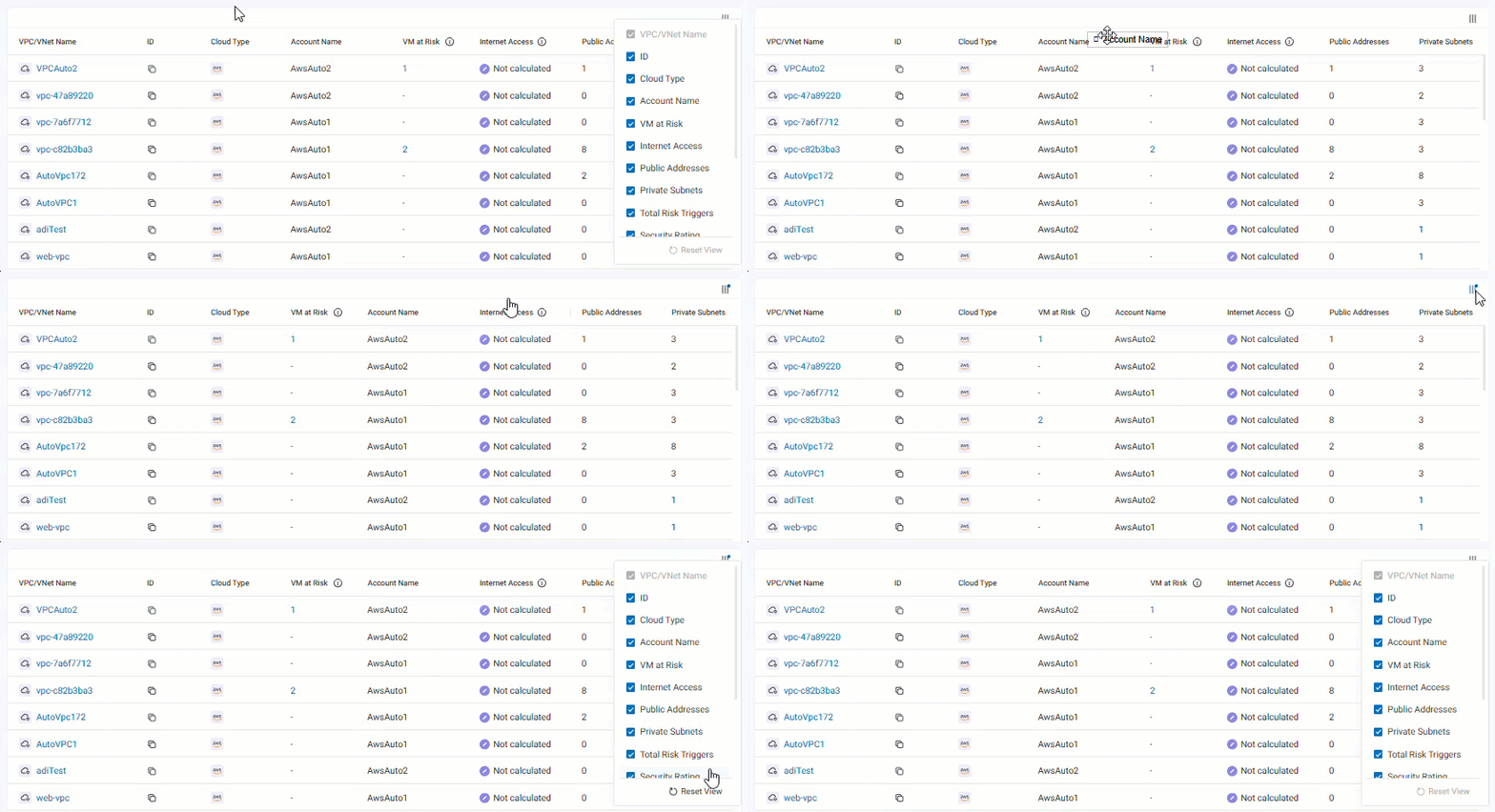
Do the following:
-
Drag column headers to reorder columns.
-
(Optional) To reset the column order, click
, located on the top right of the list of VPCs / VNETs, and then Reset View.
Show / Hide columns
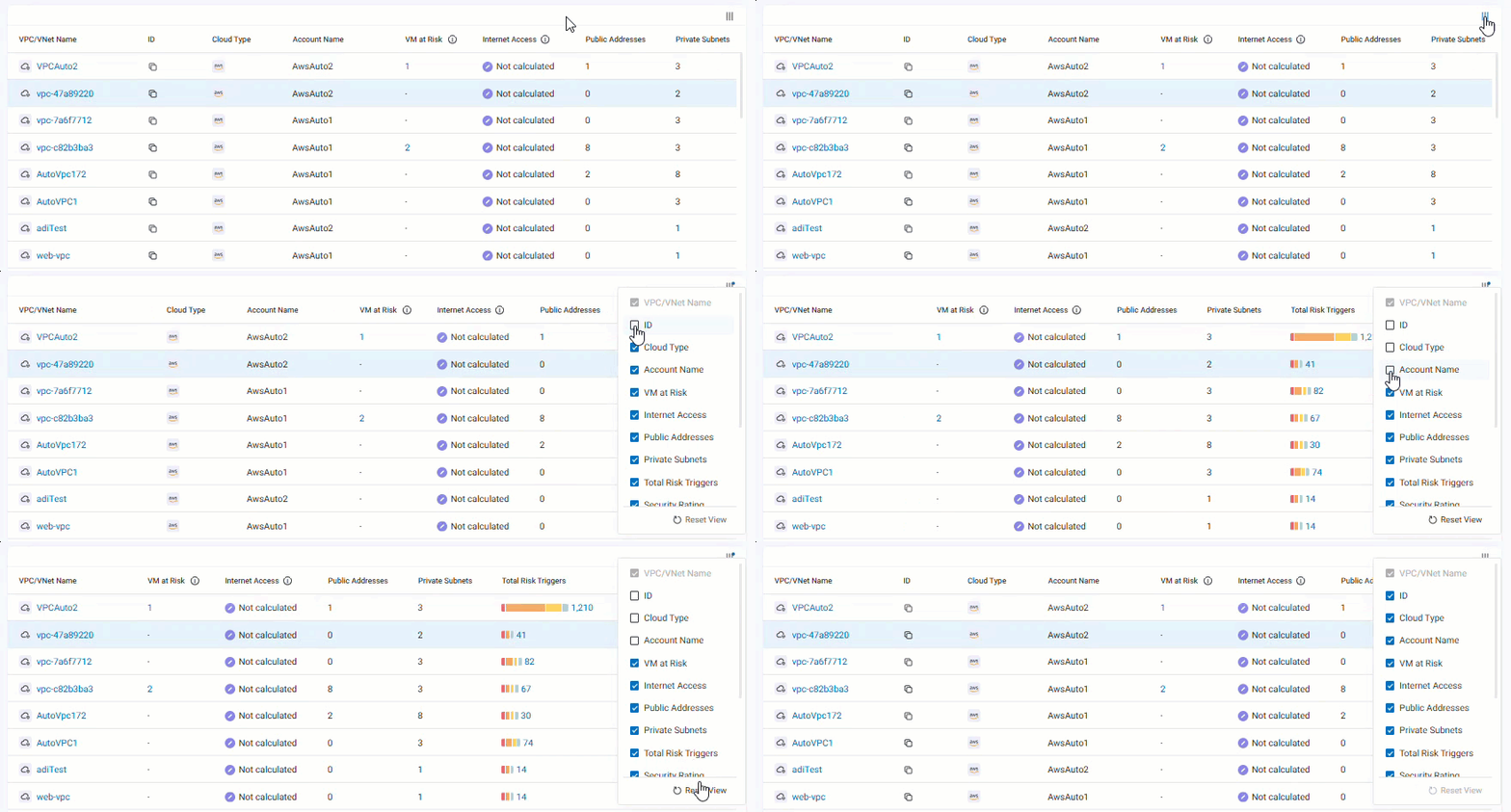
Do the following:
-
Click
, located on the top right of the list of VPCs / VNETs, and then select the columns to show or hide.Note: The VPC/VNet Name column cannot be hidden.
-
(Optional) To reset the column visibility, click
and then Reset View.
3. The Virtual Machines tab
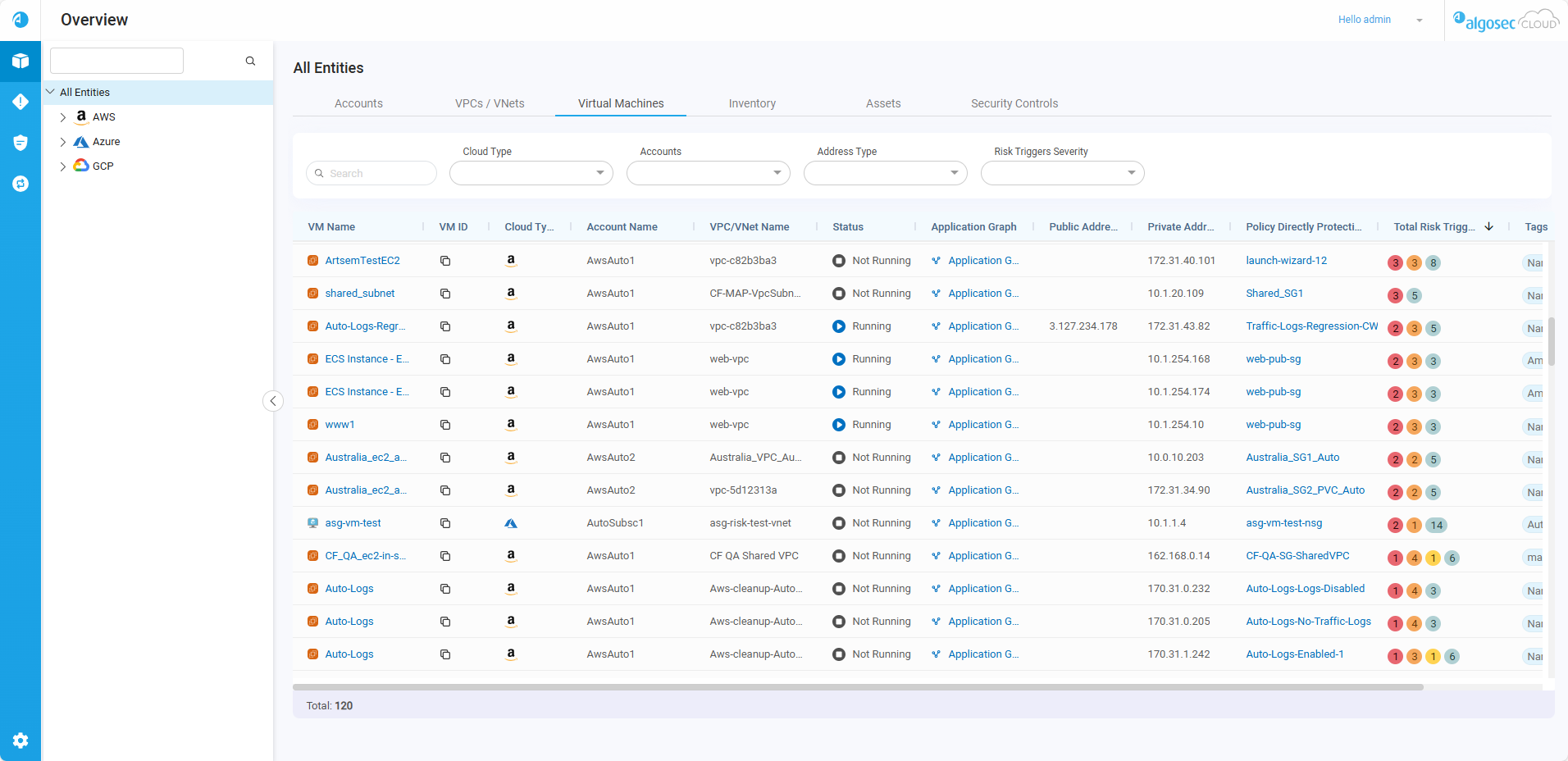
The Virtual Machines tab displays an aggregated view of Virtual machines based on your selection in the Navigation Tree and Virtual Machines tab Search and Filter options. See the table below for a description of the information available in the Virtual Machines tab.
|
VM Name |
User-defined name of the onboarded Virtual Machine. Click an VM name to view all associated risk triggers. For more details, see Review Account Status. |
|
VM ID |
The VM ID is the unique ID generated by the vendor that identifies the VM. Hover over the Tip: To copy the VM ID, hover over the |
| Cloud Type | Type of cloud Vendor. |
| Account Name | The Account Name that the VM is part of. |
| VPC / VNet Name | The VPC / VNet Name that the VM is part of. |
|
Status* |
Displays the state of the machine:
|
|
Public Address* |
The When the VM has multiple IP addresses hover over the number to see the additional IP addresses. Note for Azure:ACE displays the following:
|
|
Private Address* |
The When the VM has multiple IP addresses hover over the number to see the additional IP addresses. Note for Azure:ACE displays the following:
|
|
Policy Directly Protecting |
Displays one of the following:
|
| Network Risk triggers |
The number of risk triggers detected at each severity level associated with this VM. Each severity level has its own color, as follows: █ = Critical █ = High █ = Medium █ = Low |
| Application Graph |
Displays the name of the application related to the virtual machine as identified by ACE Cloud App Analyzer. If no application is identified, the text Application Graph appears. Click the text in the column to open the application dependency graph in ACE Cloud App Analyzer showing the applications and component microservices used by the virtual machine. Note: Application Graph is supported for AWS and Azure virtual machines. Note: Application Graph is only available with a license for AlgoSec Cloud Enterprise. For details on purchasing a license, see How to Buy a License. |
| Application Risky Findings (for AWS) |
Highlights key security issues related to the virtual machine detected during the ACE Cloud App Analyzer's VM Scan. Icons are enabled in the following cases:
|
| Tags | Any key/value definitions assigned to the VM. |
 Running: VM operating system and applications are actively running.
 Not running: VM operating system and applications are not running.
 public address of the Virtual Machine.
 private IP address of the Virutal Machine.
 Malware: Critical malware findings were detected.
 Exploitable Vulnerabilities: Critical exploitable vulnerabilities were detected.
  Open Ports: Open ports were detected.
 Internet Access: Access to internet was detected.
View risk triggers associated with a virtual machine
From the Virtual Machine tab, click a virtual machine name to see a list of all its associated risk triggers as well as details about the VM itself.
Tip: To return to the Virtual Machines tab, click Virtual Machines in the breadcrumbs.
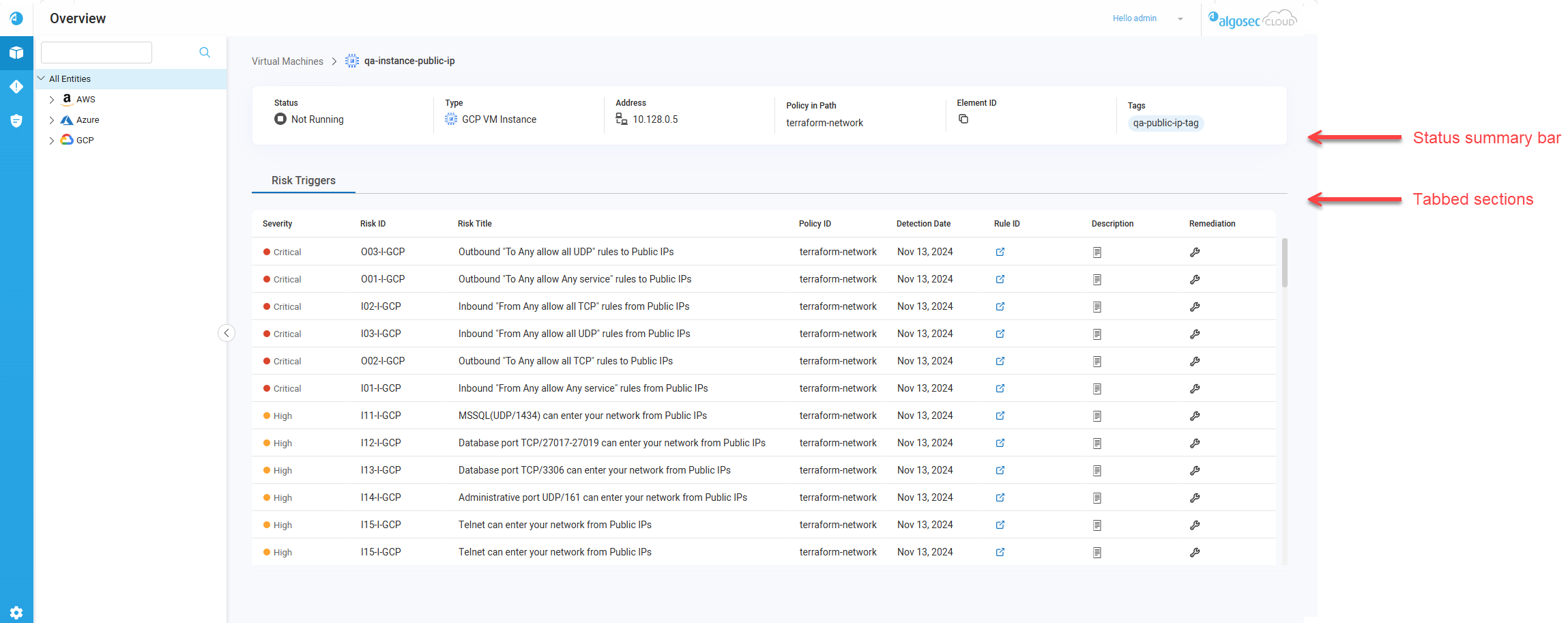
View the following information:
| Section | Description |
|---|---|
| Status summary bar | Details about the selected virtual machine. |
| Risk Triggers list |
A list of all detected risk triggers associated with the virtual machine. The tab provides the following information:
Note: The table displays a maximum of 2000 risk triggers. |
Virtual Machines tab Search and Filter options
Use the search and filter fields to see a targeted selection of assets.

| Search |
Search using partial or whole strings on the following information:
|
||
| Cloud Type | Filter by cloud vendor type(s). | ||
| Accounts | Filter Virtual Machine by its Account Name or ID. | ||
| Address Type | Filter by either Public or Private IPs. | ||
| Risk Triggers Severity |
Filter by risk severity associated with the Virtual Machine (Critical, High, Medium, Low). For Azure: select No NSG Detected to display all Virtual Machines with no protecting policy. |
||
| Application Risky Findings | Filter by application risky findings type (Malware, Exploitable vulnerabilities, Open ports). |
Customize Columns
You can rearrange columns and toggle their visibility as needed.
Rearrange columns
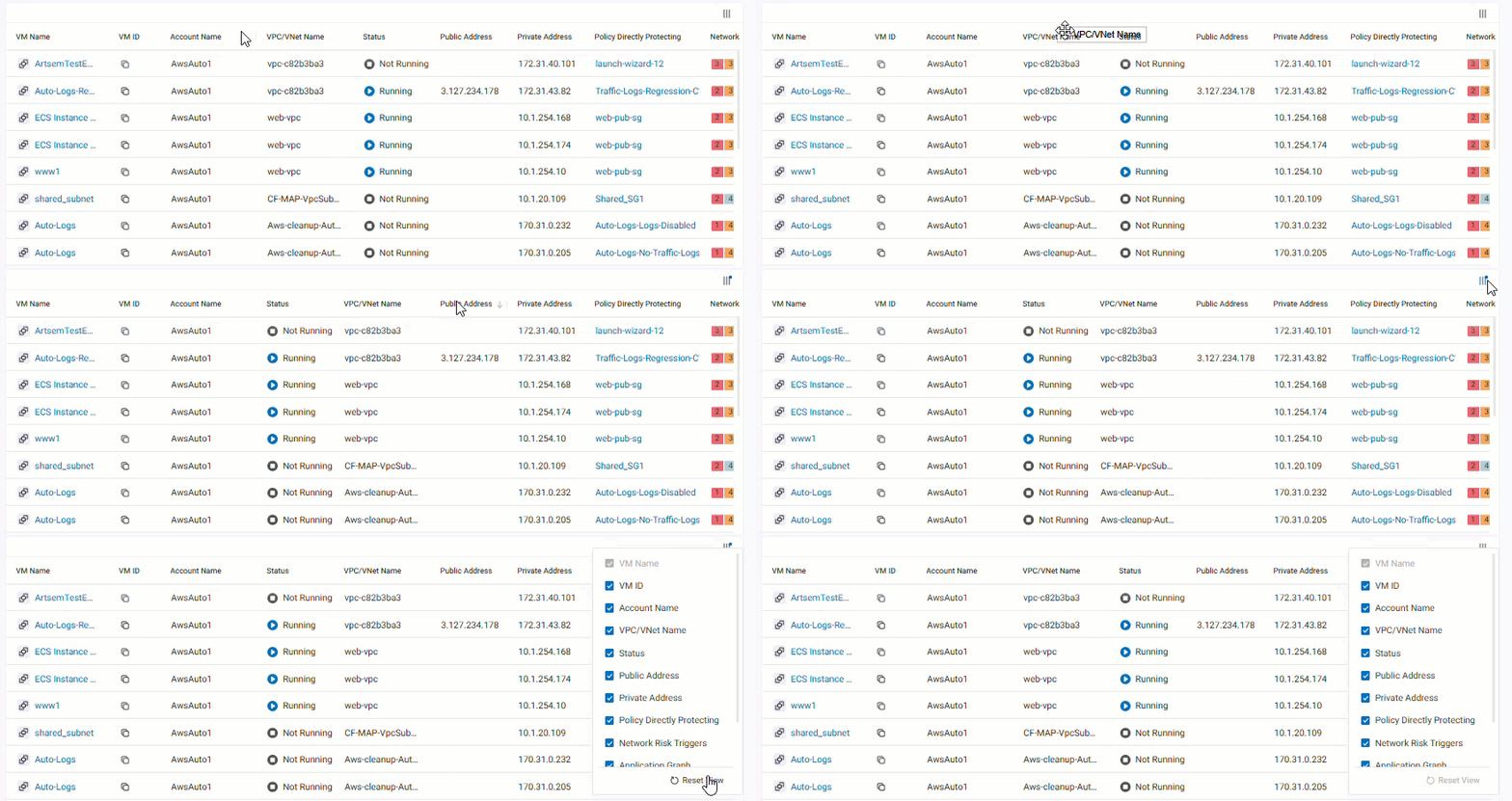
Do the following:
-
Drag column headers to reorder columns.
-
(Optional) To reset the column order, click
, located on the top right of the list of virtual machines, and then Reset View.
Show / Hide columns
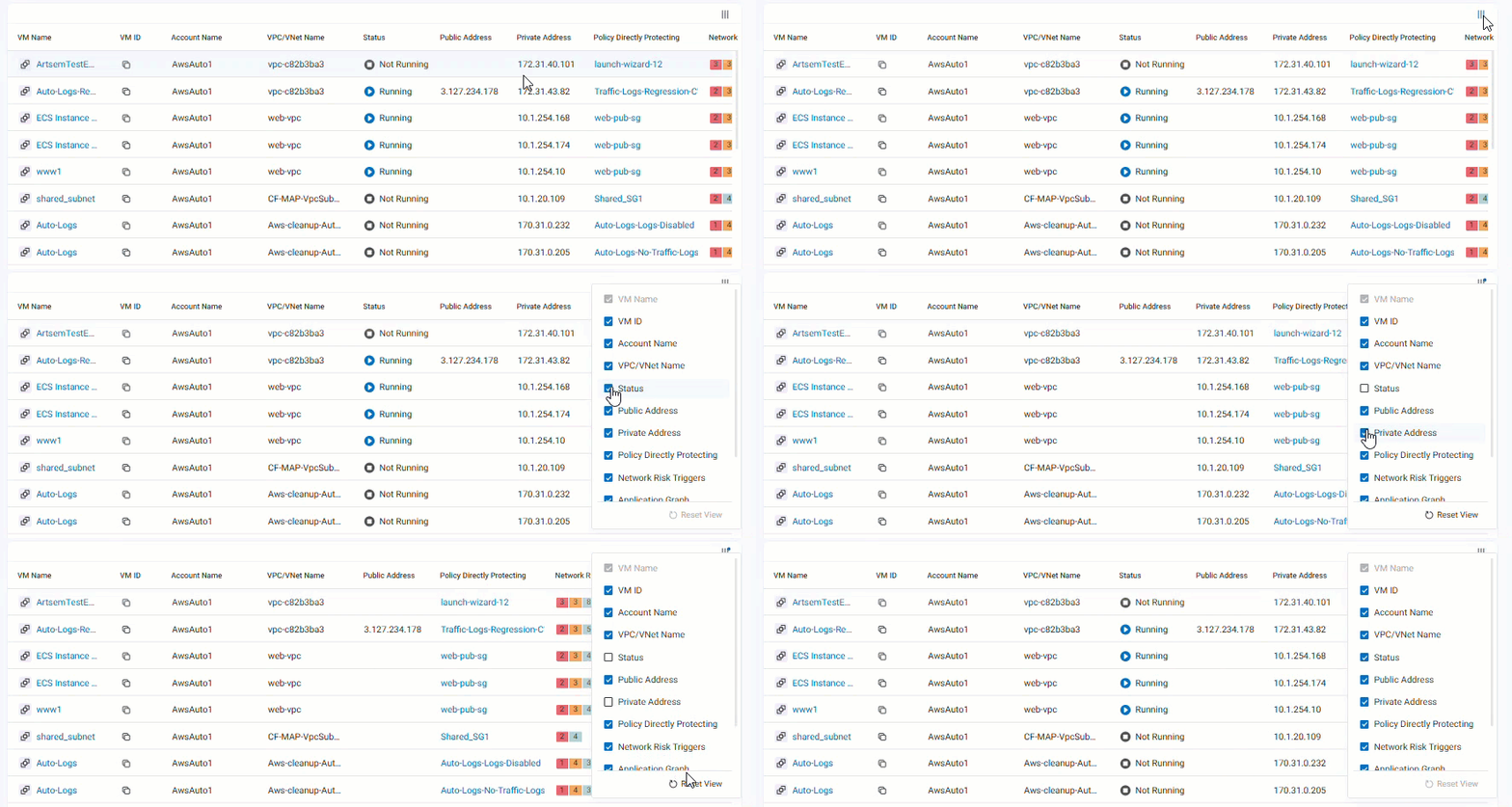
Do the following:
-
Click
, located on the top right of the list of virtual machines, and then select the columns to show or hide.Note: The VM Name column cannot be hidden.
-
(Optional) To reset the column visibility, click
and then Reset View.
Export virtual machine report to a CSV file
You can export a report of virtual machine information across all your accounts to a CSV file according to selected entities in the tree and filters (Cloud Type, Account, Address Type, etc.). See each virtual machine’s network details, including IPs, protection policy, tags, network risks, and any detected threats tied to its application.
Do the following:
On the Virtual Machine tab:
-
(Optional) Customize the report results by using the dropdown filters as needed.

Note: Text entered into the Search field has no effect on the contents of the CSV file.
-
Click
 Export to CSV.
The Export Report to CSV popup appears.
-
(Optional) By default, the report name consists of Virtual Machines Report and the date the report was generated. You can enter a new name for the report.
-
Click Export.
The report is downloaded to your computer.
Note:
-
Only one report can be generated at a time.
-
Report generation can take up to 20 minutes.
-
If report generation fails, you will need to wait up to 20 minutes before trying again.
-
4. The Inventory tab
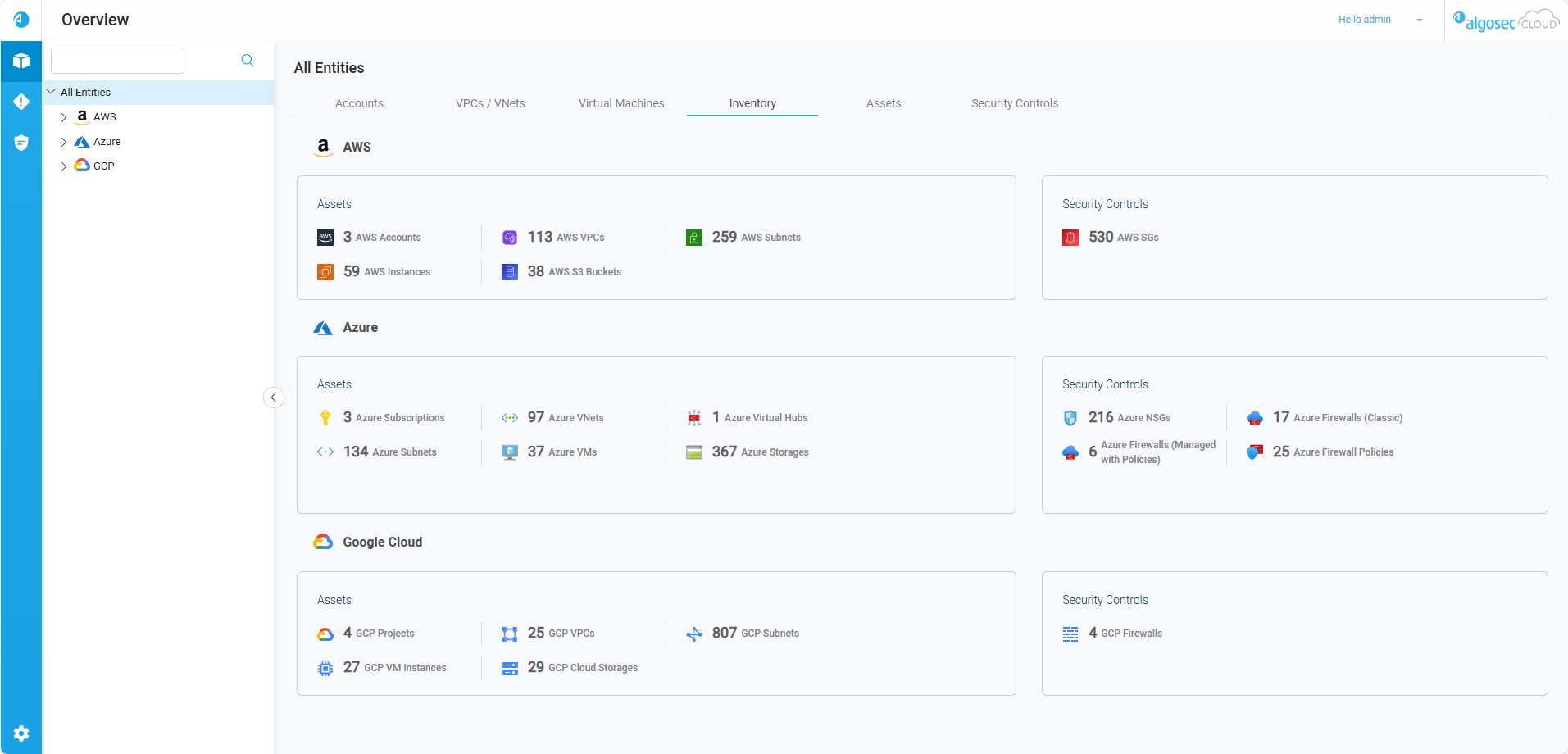
The Inventory tab displays an overview of the selected Assets and Security Controls based on your selection in the Navigation Tree. See the table below for a description of the information available in the Inventory tab.
Inventory resource types
Your ACE inventory is organized into the following resource types:
|
Assets |
AWS
Azure
Google Cloud
|
|
Security controls |
Includes the following types of security controls:
|
Note: The assets displayed in the Inventory tab is a partial selection highlighting the most important assets. For a comprehensive list of all assets, along with detailed information about each, please refer to the Assets tab.
5. The Assets tab
The Assets tab displays an aggregated view of assets based on your selection in the Navigation Tree and Assets tab Search and Filter options. See the table below for a description of the information available in the Assets tab.
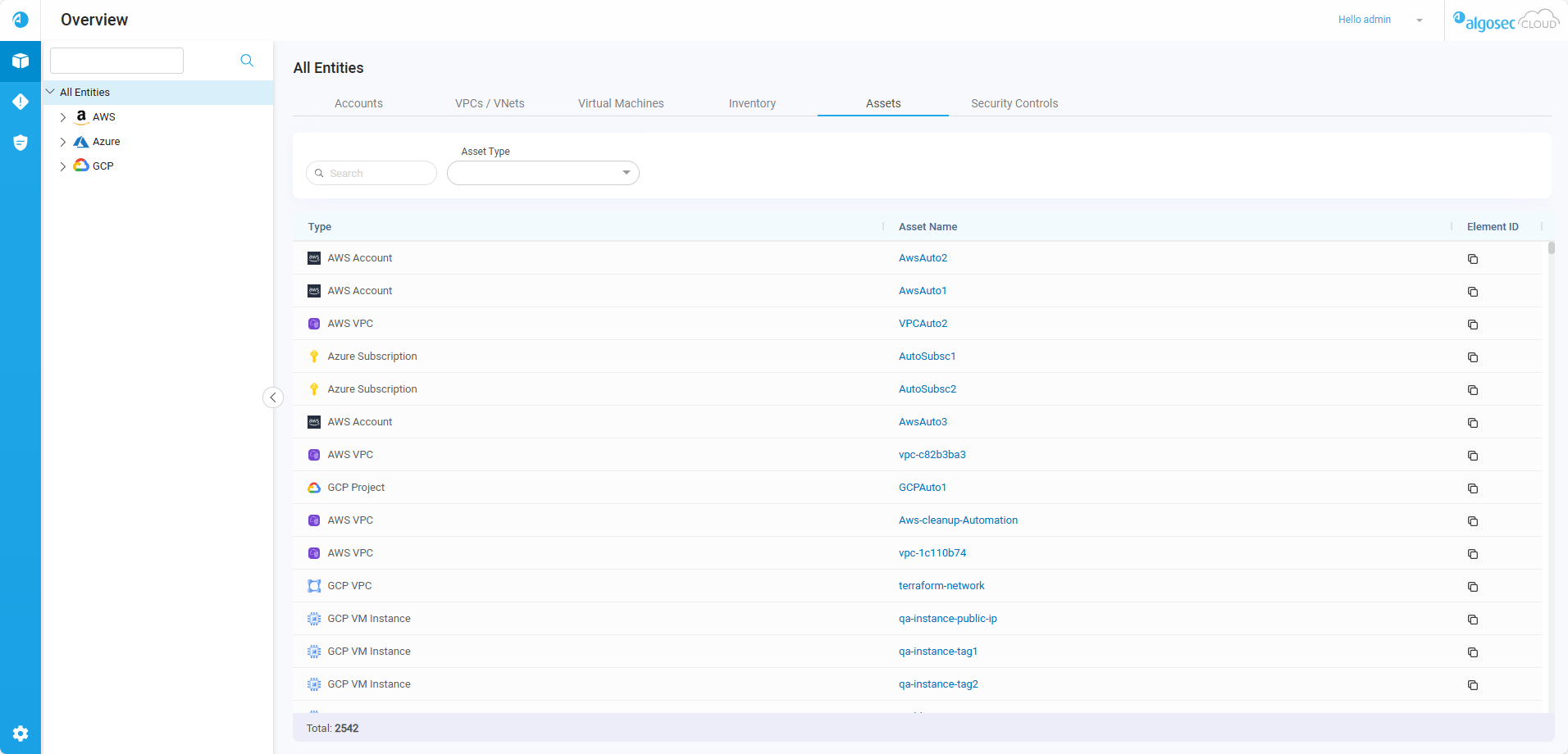
| Type | Type of cloud asset. |
|
Asset Name |
User-defined name of the onboarded asset. Click an asset name to view element details. See View Element Details. |
|
Element ID |
The Element ID is the unique ID generated by the vendor that identifies the element. Hover over the Tip: To copy the Element ID, hover over the |
Assets tab Search and Filter options
Use the search and filter fields to see a targeted selection of assets.

| Search | Search accounts using partial or whole asset or policies names. |
| Cloud Type | Filter by cloud vendor type(s). |
| Asset Type | Filter by asset type(s). |
Customize Columns
You can rearrange columns and toggle their visibility as needed.
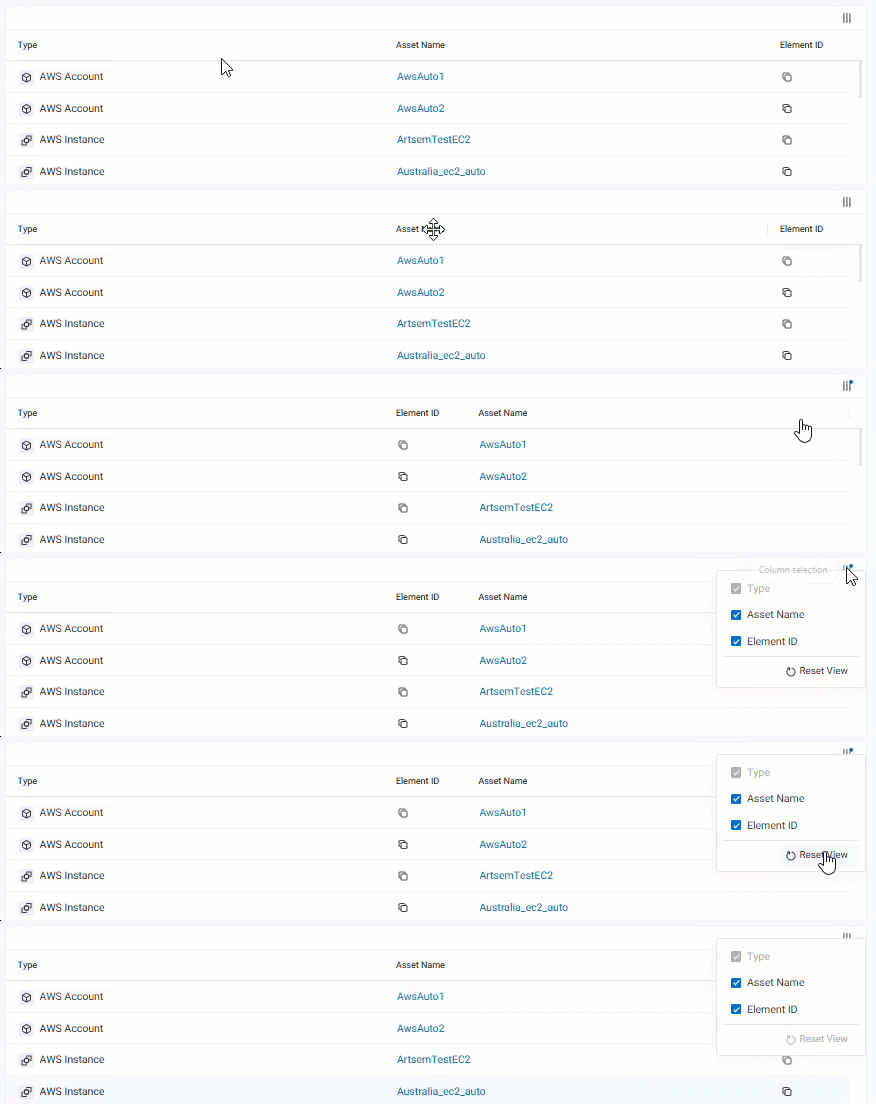
Rearrange columns
Do the following:
-
Drag column headers to reorder columns.
-
(Optional) To reset the column order, click
, located on the top right of the list of assets, and then Reset View.
Show / Hide columns

Do the following:
-
Click
, located on the top right of the list of assets, and then select the columns to show or hide.Note: The Type column cannot be hidden.
-
(Optional) To reset the column visibility, click
and then Reset View.
6. The Security controls tab
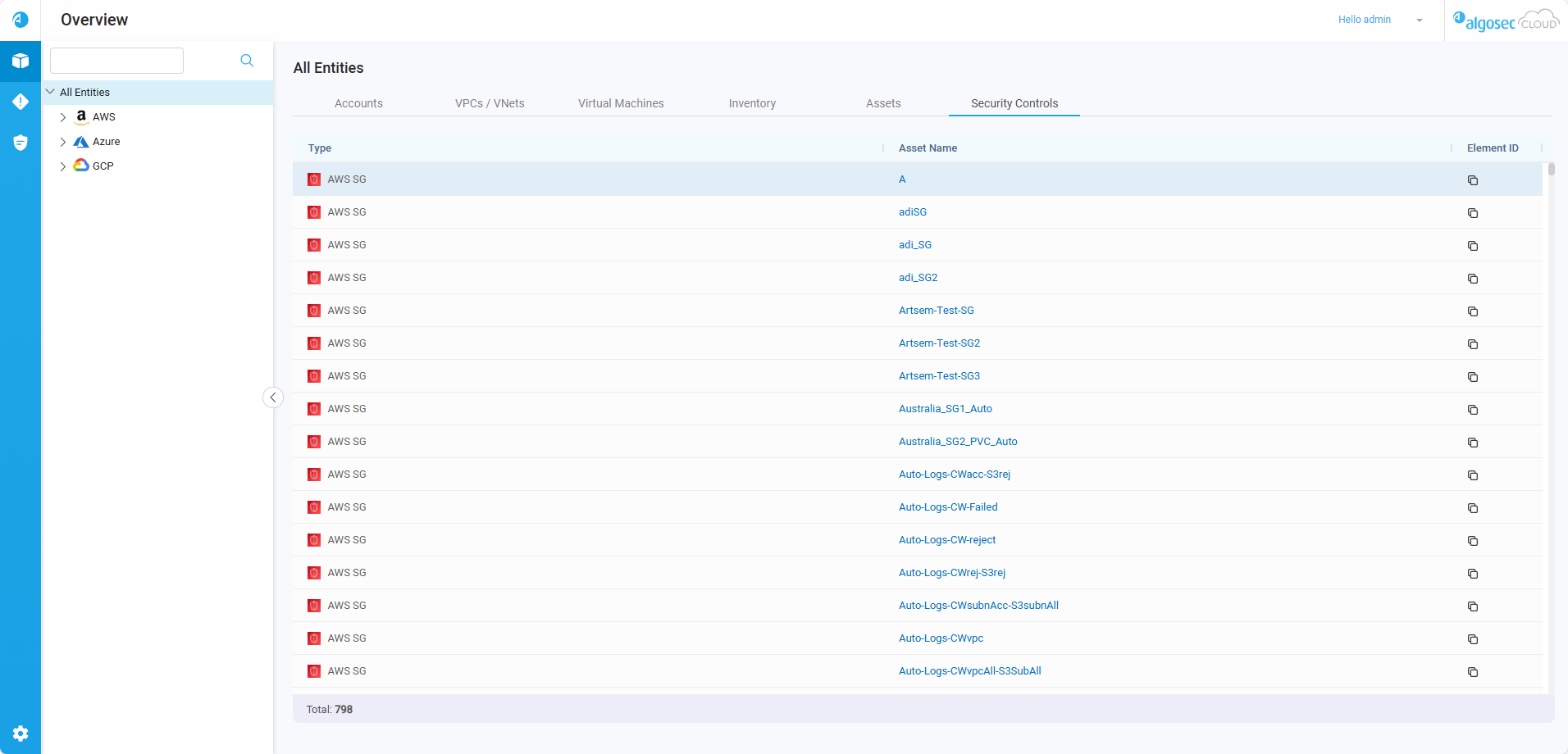
The Security controls tab displays a detailed list of the relevant security controls based on your selection in the Navigation Tree.
-
Click the name of the security control to view element details. See View Element Details.
Customize Columns
You can rearrange columns and toggle their visibility as needed.
Rearrange columns
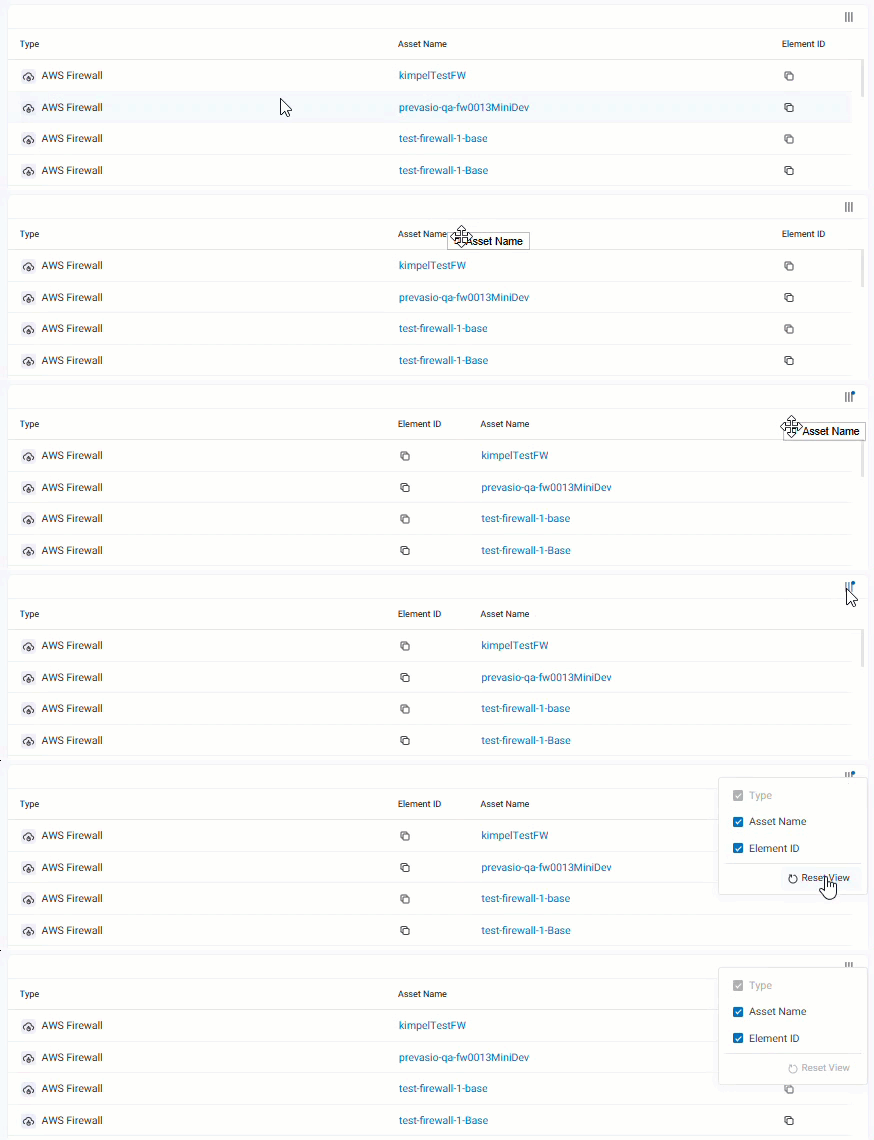
Do the following:
-
Drag column headers to reorder columns.
-
(Optional) To reset the column order, click
, located on the top right of the list of security controls, and then Reset View.
Show / Hide columns
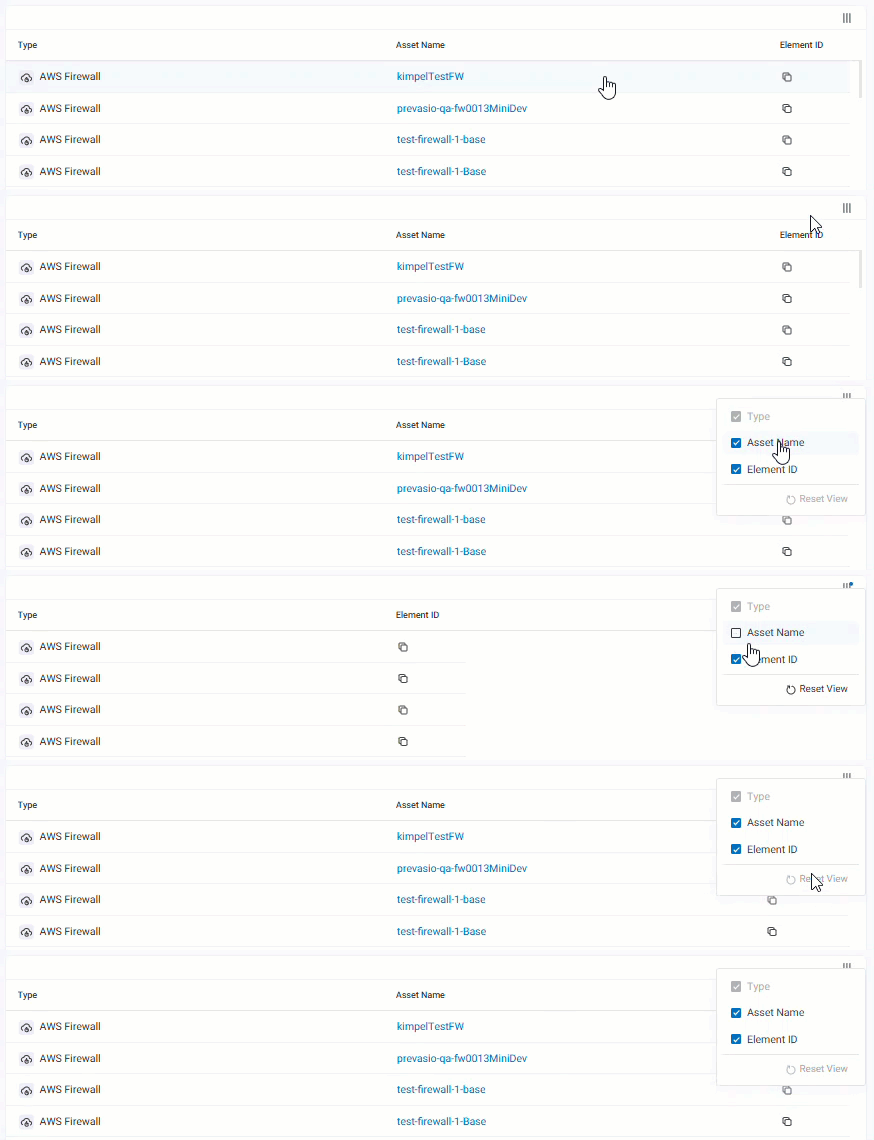
Do the following:
-
Click
, located on the top right of the list of security controls, and then select the columns to show or hide.Note: The Type column cannot be hidden.
-
(Optional) To reset the column visibility, click
and then Reset View.
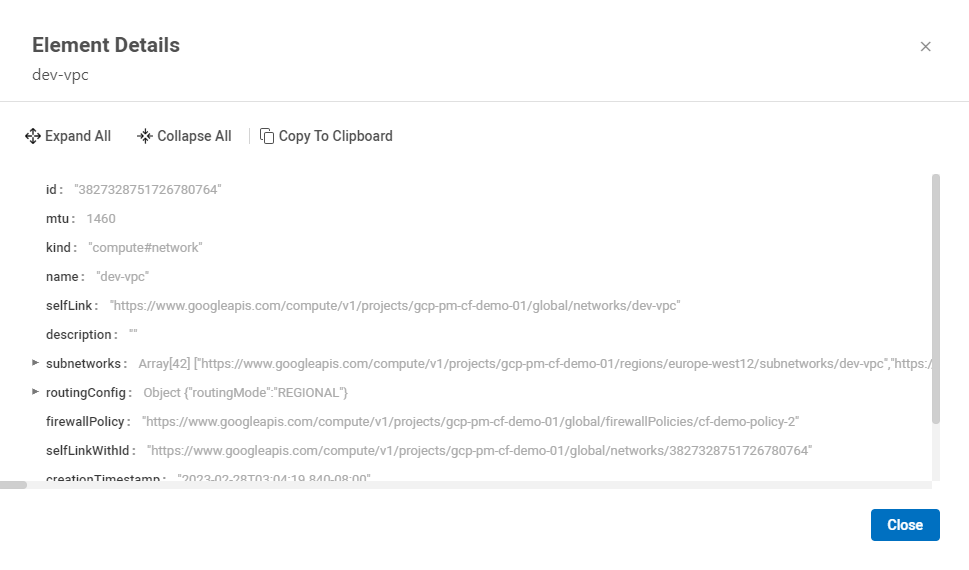
View Element Details
In the Assets and Security Controls tabs, you can click on the name of the asset or security control to display the Element Details window.
â See also:


