Set Compliance Standards Visibility
The Standards page in Cloud App Analyzer lets you choose which compliance standards are shown in the UI and in compliance findings. This allows you to focus only on the frameworks that matter to your organization.
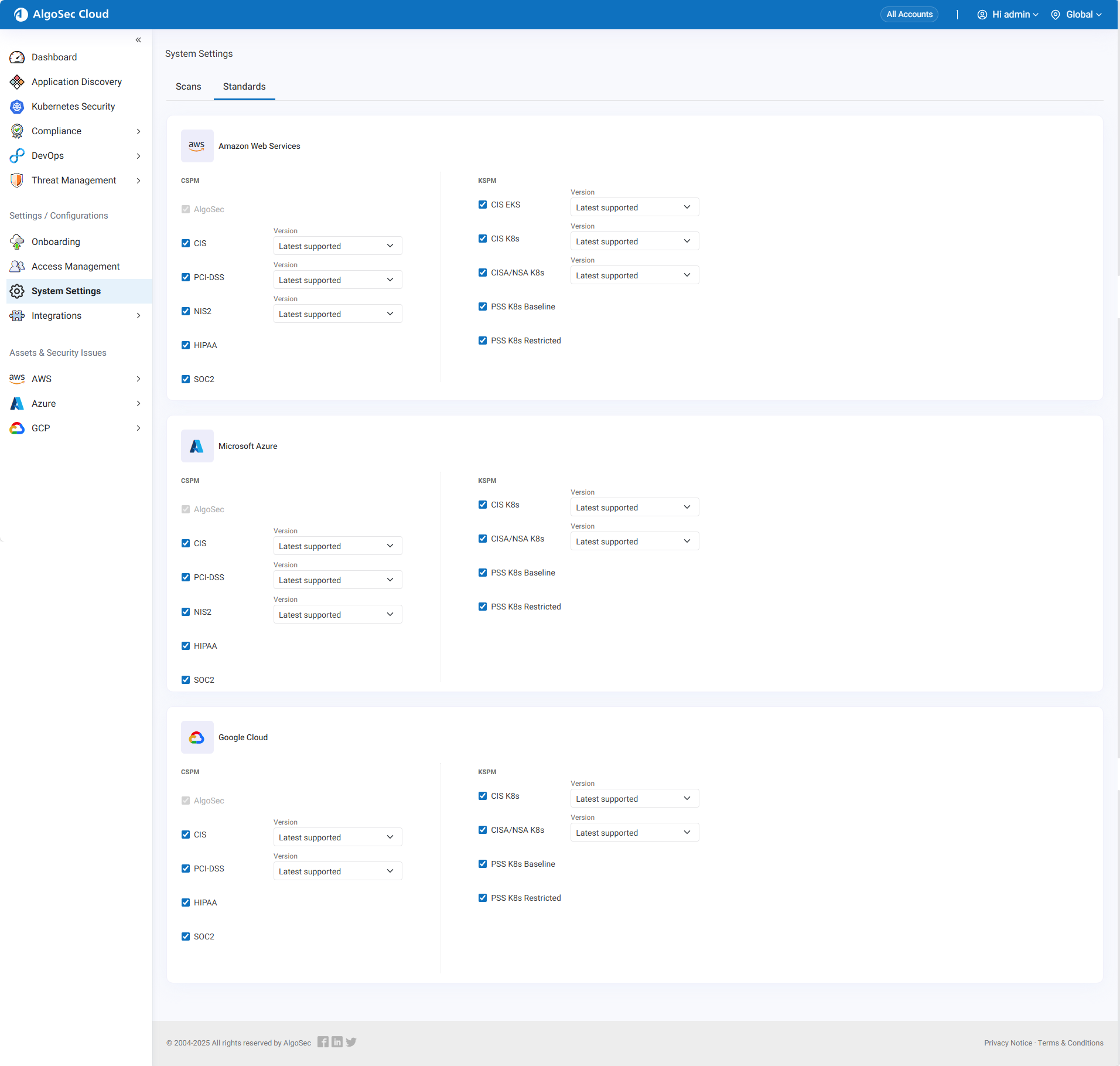
Each cloud provider—AWS, Azure, and Google Cloud—has its own section on the page. Within each section, compliance standards are grouped into two categories: Cloud Services Standards and Kubernetes Standards. For each listed standard, you can select a checkbox to make it visible. When selected, the standard appears in the UI and its results are included in compliance scans. When not selected, the standard is hidden or shown as unavailable.
Some standards also include a version selector. By default, the Latest Supported version is shown, ensuring you are always aligned with the most current supported release. If your organization requires alignment with an older benchmark, you can instead choose from previously supported versions.
How to Select Standards
-
In Cloud App Analyzer left side menu, select System Setting > Standards tab. The Standards page opens
-
Go to the cloud provider section you want to configure (AWS, Azure, or Google Cloud).
-
Select the checkboxes for the standards you want to make visible.
-
If a standard has a version dropdown, choose between Latest Supported or a previous supported version.
Your compliance dashboards and findings now reflect only the standards you selected.


 Clear your browser's cache