Use the Object Search bar at the top of the every ObjectFlow page to perform a simple or advanced object search.
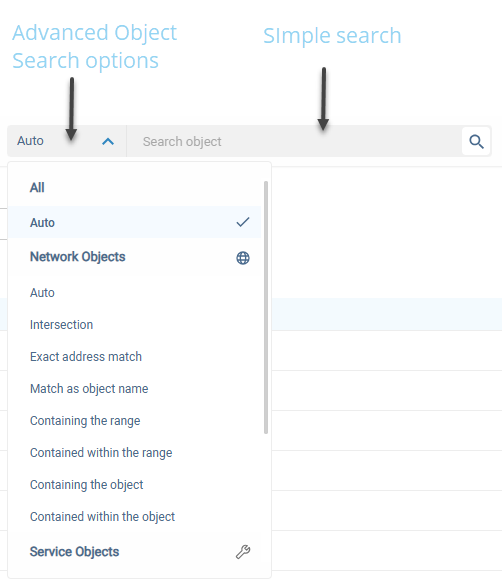
Tip: To perform a simple search for objects,
enter one of the following in the Search Object field, and click the search icon -  :
:
- Any part of the object's name
- For a network object: An IP address that intersects the object
- For a service object: Content (for example, tcp/80) that intersects the object
When the matching objects are displayed below the search box, select one from the list.
To use the Advanced Object Search:
-
In the Advanced Object Search drop-down menu of the Object Search bar, select one of the following options:
For All object types
Search parameter A search will return... Auto
Simple search results:
-
All network and service objects whose names contain the searched phrase
-
If an IP address/range is entered, then all servers which intersect with the given content are displayed
For Network objects
Search parameter A search will return... Auto
Simple search results:
-
All objects whose names contain the searched phrase
-
If an IP address/range is entered, then all servers which intersect with the given content are displayed
Intersection
All objects that have any overlap with the searched content (IP address)
Exact address match
All objects that are an exact match of the searched content (IP address)
Match as object name
All objects whose name contains the searched phrase
Containing the range
All objects that contain the searched content (IP address)
Contained within the range
All objects that are entirely contained in the searched content (IP address)
Containing the Object All objects that contain the searched object Contained within the Object All objects that are entirely contained in the searched object -
-
All service objects whose names contain the searched phrase
-
Any service objects that have content whose Destination Port intersects with the searched phrase
-
When you enter Protocol/Destination Port, the results includes any source port.
-
When you enter Protocol/Destination Port/Source Port, the result be limited to only those with the specified source port
-
Wildcards are allowed
- Type the search criteria into the search box, and click .
- Select one or more objects from the list below the search box.
For Service objects:
| Search parameter | A search will return... |
|---|---|
|
Auto |
Simple search results: |
|
Match as object name |
All service objects whose names contain the searched phrase |
|
Exact content match |
All service objects that are an exact match of the searched content (you can specify Protocol/Destination Port or Protocol/Destination Port/Source Port) Tip: |
|
Intersection |
All service objects that have any overlap with the searched content (specify a Destination Port or a Destination Port Range) |
|
Contained within destination port range |
All service objects whose Destination Port Range is entirely contained in the searched content (specify a Destination Port Range) |
|
Contained within source port range |
All service objects whose Source Port Range is entirely contained in the searched content (specify a Source Port Range) |


 Clear your browser's cache