Global Trusted Host Groups (Trusted Networks)
Note:
Trusted Networks are configured as part of Custom risk profiles based on Standard Plus and affect how risks are calculated. Before defining Trusted Networks, review Manage Risk Profiles to understand how Standard, Standard Plus, and Custom profiles impact risk analysis. See Manage risk profiles.
Trusted Networks (also referred to as Global Trusted Host Groups) allow you to define IP addresses or network ranges that ACE treats as trusted during risk analysis.
When a security rule’s entire source or entire destination is within a trusted network, ACE does not trigger Standard Plus risks for that rule.
Trusted Networks help reduce noise by preventing known, acceptable traffic from generating risks, rather than suppressing risks after they appear.
Important Scope and Behavior
-
Trusted Networks apply only to Standard Plus risk calculation
-
Trusted Networks affect all accounts and all vendors
-
Trusted Networks are global, even if defined in a single risk profile
-
Trusted Networks prevent risks from being created (they are not suppressions)
Note: Trusted Networks do not affect risks calculated by the Standard risk profile.
How it works?
A rule is considered trusted when one side of the rule is fully trusted:
-
All source IPs are within a trusted network OR
-
All destination IPs are within a trusted network
If this condition is met, no Standard Plus risks are triggered for that rule.
If both source and destination include untrusted IPs, or if the trusted range does not fully cover the rule’s source or destination, risks are still triggered.
Note: A rule is trusted only if either all of its sources or all of its destinations belong to a trusted network. If both source and destination include untrusted IPs, the rule will generate risks.
| Risks are triggered? | Note | |||
|---|---|---|---|---|
| Example 1 | 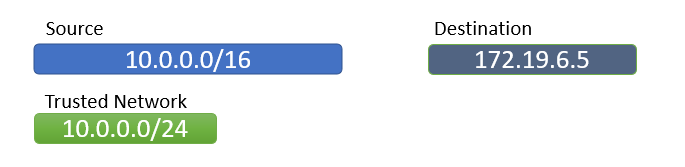
|
No | Source is in trusted network | |
| Example 2 | 
|
No | Destination is in trusted network | |
| Example 3 | 
|
Yes | Trusted range is smaller than rule range | |
| Example 4 | 
|
Yes | Both source and destination have IPs outside the trusted network | |
Defining Trusted Networks
Trusted Networks are defined using the Risk Profile Excel file.
Do the following:
-
Open the Risk Profile Excel file
-
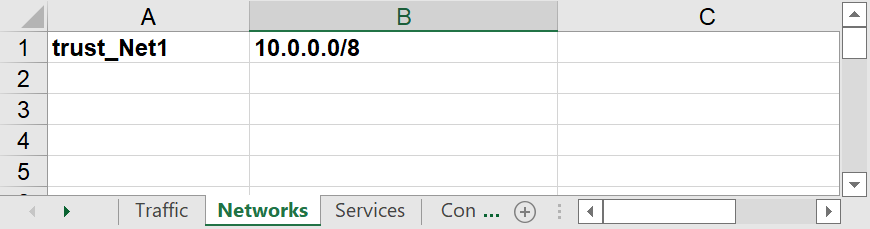
Go to the Networks tab
-
Add a network object with a name that starts with trust_ (e.g. trust_Net1).
Note: "trust" is case-sensitive.
Naming Rules and Limitations
Network Name vs. Network Value
Trusted networks cannot use raw IPs as names:
-
Invalid name (The name must not be an IP address): trust_10.10.10.0
-
Valid name: trust_ip10.10.10.0
Interaction with Zones (Internal / DMZ / External)
If a network name contains both trust_ and Zone markers (for example _DMZ, _Internal), then:
-
Trust takes precedence
-
The network does not appear in the topology
-
Zone classification is ignored
Best Practice:
Do not mix trust and zone logic in the same network object.
Instead, define separate objects, for example:
-
trust_Net1 (trusted logic)
-
Net2_DMZ (zone logic)
For more details on internal markers, see User-Defined Network Zone Definitions: Enhanced Risk Accuracy.
Global Impact of Trusted Networks
Trusted Networks are global for Standard Plus–based risk analysis.
They apply to all accounts and rules evaluated using Standard Plus or Custom profiles based on Standard Plus, even if the profile defining them is not assigned to any account.
Trusted Networks do not apply to accounts evaluated using the Standard risk profile.
Caution: Defining a Trusted Network is a global decision and should be done carefully.


 Clear your browser's cache