Onboard AWS Accounts
This topic explains how to onboard AWS accounts to ACE.
ASMS Integration Note:
-
For ASMS A33.10+:When ACE is connected to ASMS, AWS accounts added to ACE are automatically onboarded to ASMS. For more information, see the ASMS tech docs:Simultaneously Onboard AWS Accounts into ACE and ASMS.
-
For ASMS A33.00: ASMS A33.00 includes an early availability feature that lets you onboard AWS accounts to ACE and ASMS simultaneously. This streamlines the onboarding process: after AWS accounts are added to ACE, they are automatically onboarded to ASMS. For more information, see the ASMS tech docs: Onboard AWS accounts to both AlgoSec Cloud and ASMS simultaneously.
How AWS Onboarding Works
ACE connects to AWS using a secure, role-based access model.
During onboarding, an AWS administrator deploys an AlgoSec-provided CloudFormation template or Terraform configuration. This deployment creates the IAM role and permissions required for ACE to read AWS networking and security configuration.
After the deployment is complete, ACE discovers AWS resources such as:
-
VPCs
-
Subnets
-
Security Groups
-
Route Tables
-
Transit Gateways
-
Network Firewall resources
Depending on the onboarding method you choose, ACE can also automatically synchronize changes made in AWS after onboarding.
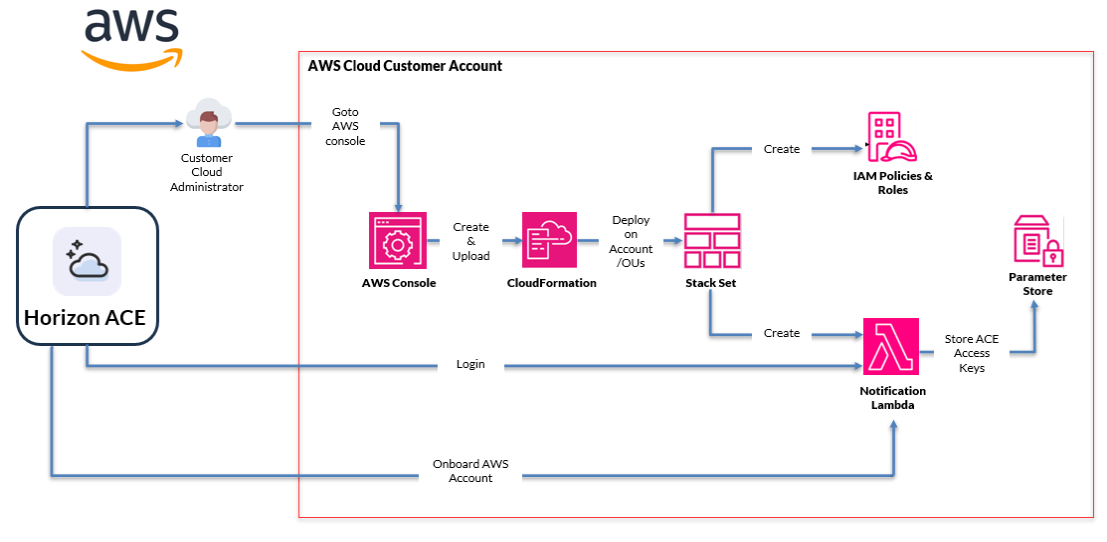
ACE uses role-based access to discover and continuously synchronize AWS networking and security resources.
AWS Onboarding Flow (Via Wizard)
-
Start AWS onboarding in ACE.
-
Select an onboarding method and deploy. See below Onboarding methods for AWS Accounts.
-
AWS creates the required IAM role and permissions.
-
ACE securely accesses AWS configuration data.
-
AWS resources are imported into ACE.
-
ACE automatically synchronizes future changes when using CloudFormation or Terraform onboarding.
Who performs AWS onboarding?
AWS onboarding typically requires collaboration between:
-
An AWS administrator, who deploys the CloudFormation template or Terraform configuration in AWS.
-
An ACE administrator, who initiates the onboarding process and verifies the connection.
The deployment creates the IAM role and permissions required for ACE to access AWS configuration data.
Onboarding methods for AWS Accounts
Choose the onboarding method that best fits your AWS environment and operational model.
Some onboarding methods support automatic synchronization, allowing ACE to detect and import changes made in AWS after onboarding.
| Onboarding Method | Description | Automatic synchronization |
|---|---|---|
| CloudFormation (recommended) | Via the onboarding wizard: Generates and deploys an AWS CloudFormation template. | Yes |
| Terraform | Via the onboarding wizard: Uses Terraform to deploy the required AWS permissions and onboarding resources. | Yes |
| REST API (single account) | Onboard a single AWS account via API | No |
Automatic Synchronization
-
CloudFormation and Terraform onboarding support automatic synchronization.
-
ACE automatically discovers and imports changes made in AWS.
-
API onboarding is limited to a single AWS account and does not support automatic synchronization.
Note:
-
For more information about the AWS onboarding script, see Inside the AWS Onboarding Script (CloudFormation).
-
For more information about the AWS onboarding script (using terraform), see Inside the AWS Onboarding Script (Terraform).
Note: Deleting AWS accounts is not automatically synced. To remove AWS accounts from AlgoSec Cloud Enterprise after deletion in AWS, refer to Offboard AWS accounts from ACE.
Before you start
-
Make sure you are logged on to AWS Console
 .
. -
If you want to configure VPC flow logs, see VPC Flow Logs and Enable AWS VPC flow logging.
Onboard AWS accounts
Note: For issues onboarding AWS accounts, see Troubleshoot Onboarding.

Do the following:
Note: If you have licenses for both Cloud Network Security (CNS) and Cloud App Analyzer (CAA) but want to deploy only CNS in AWS, refer to this KB article for the correct CNS-only onboarding steps.
-
In the ACE
 Settings area, click Onboarding.
 -
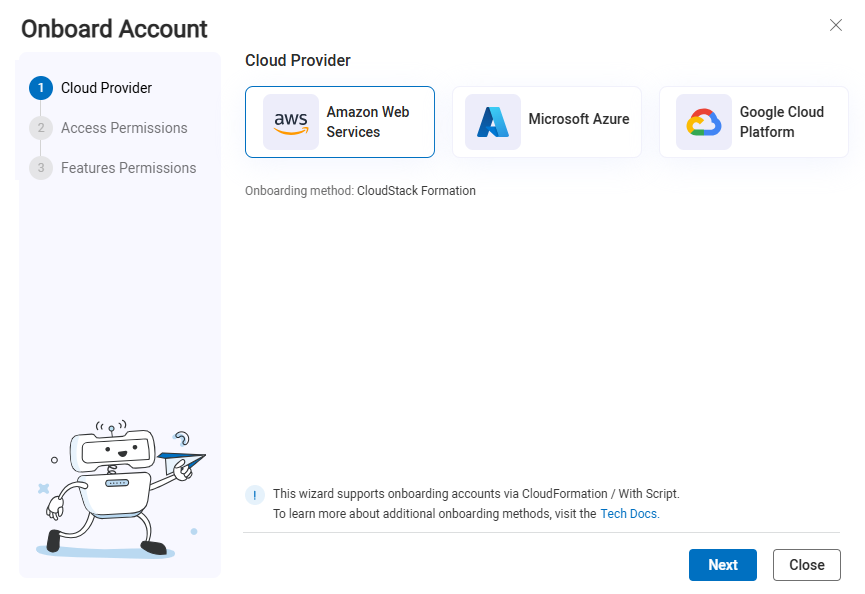
On the Onboarding Management page that opens, click +Onboard Accounts. The Onboard Account Wizard opens.
-
Click the
 Amazon Web Services button.
 -
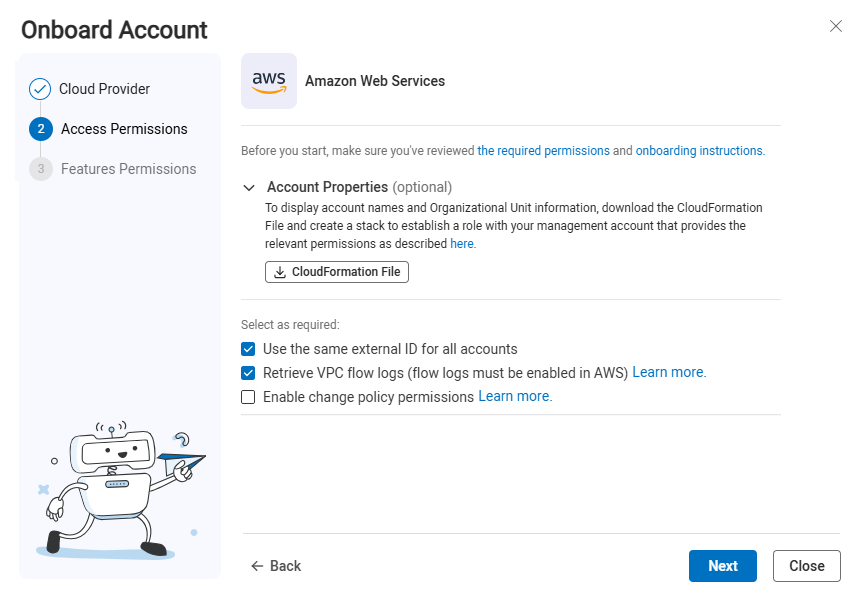
The AWS Onboarding Wizard Access Permissions step opens.
-
(Optional) Account Properties:
Note: The download CloudFormation File button on this step is tied to Account Management and is different from the file downloaded at the end of the onboarding wizard.
If you plan to onboard multiple AWS accounts and you want to display AWS Account names, Organizational Unit and information about suspended accounts in ACE, it's necessary to establish a role within your management account that grants ACE permissions. See Permissions to display account properties.
-
Click
 and save to a local folder on your computer.
 -
Log on to AWS Console on your management account (with administrative permissions)
-
Follow the steps in the AWS documentation
.
-
-
Specify the details below; they will be included in the file available for download at the end of the onboarding wizard.
Optional settings Description Use the same external ID for all accounts Select to use the same external ID for all accounts Retrieve VPC Flow Logs Select to retrieve VPC Flow Logs. For more information, see VPC Flow Logs. Enable permissions for policy change AlgoSec only needs READ permissions to provide support for your AWS security policy management. This requirement ensures you can still receive complete security analysis and recommendations while granting the minimal level of access.
Write permissions can optionally be added for advanced policy change capabilities.
-
Unselect to fully support your AWS security policy management, security analysis and recommendations. For more information, see Permissions Required for AWS Accounts.
-
Select for advanced policy change capabilities:
-
Base Read permissions, as described in AWS permissions and justifications,
-
Additional Write permissions, outlined in Additional permissions for optional features.
-
-
-
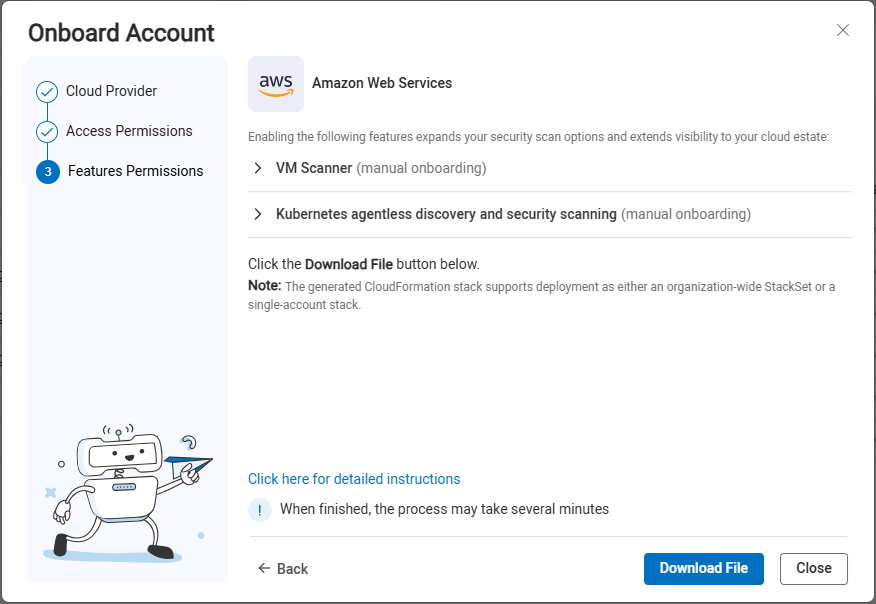
Click Next. The Features Permissions step of the wizard opens.
-
Onboard VM Scanning (optional)
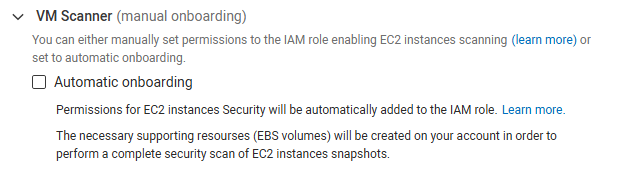
The VM Scanner feature enables scanning Elastic Block Store (EBS) volumes attached to EC2 instances across multiple regions in an AWS account. ACE Cloud App Analyzer's VM Scanner enhances cloud workload security by providing agentless scanning for AWS EC2 instances that have volumes attached. For more information, see Enable Virtual Machine Security (AWS).
-
Select Grant required permissions to the IAM role to automatically add permissions to EC2 instances security to the IAM role. For a list of permissions that are added see Permissions Required for AWS Accounts.
-
If you choose not to grant permissions in the wizard, you can always manually set permissions to the IAM role enabling EC2 instances scanning later. See Manually add VM scanning permissionsManually add VM scanning permissions.
-
-
Onboard Kubernetes Scanning (optional)
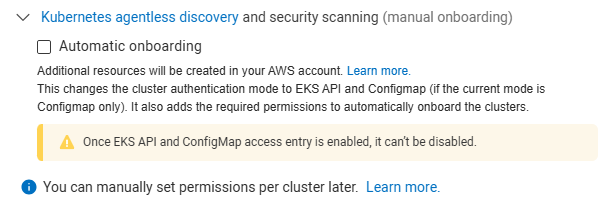
Cloud App Analyzer provides agentless discovery and detection of vulnerabilities, compliance, and configuration risks for Kubernetes components. For more information, see Kubernetes Services Risks Management.
-
Select Create additional resources in the AWS account to be automatically onboarded. For information related to automatic onboarding, see Kubernetes Security Automatic onboarding.
-
If you choose not to create additional resources in the wizard, you can always onboarded manually later. For instructions for manual onboarding, see Kubernetes Security Manual onboarding.
-
-
Onboard CD Mitigation (optional)
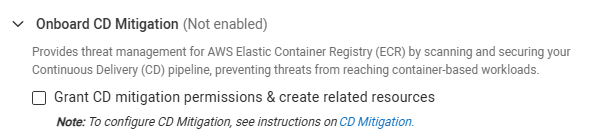
The CD Mitigation feature provides threat management for AWS Elastic Container Registry (ECR) by scanning and securing your Continuous Delivery (CD) pipeline, preventing threats from reaching container-based workloads.
-
Select Grant CD mitigation permissions & create related resources to be automatically onboarded.
-
If you choose not to Grant CD mitigation permissions & create related resources in the wizard, you can always onboard manually later.
-
-
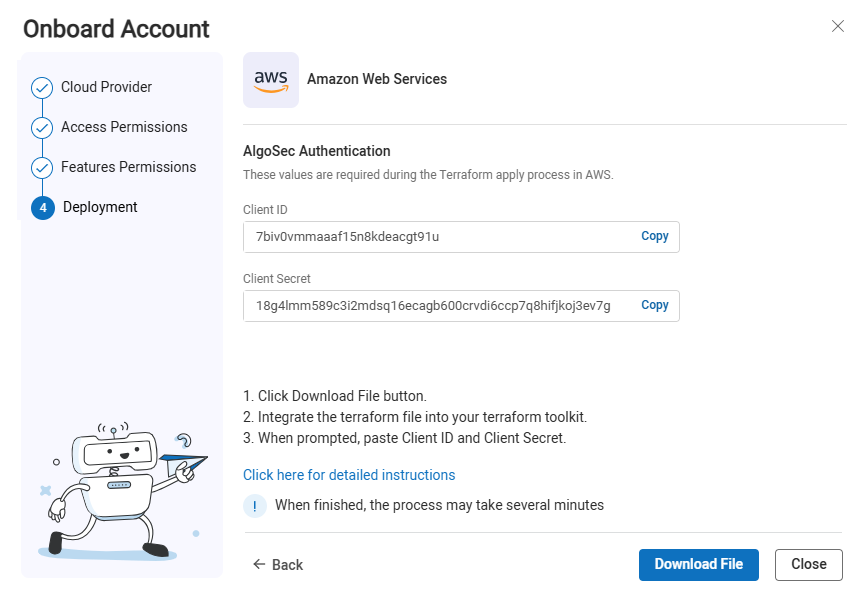
Click Next. The Deployment step of the wizard opens.
-
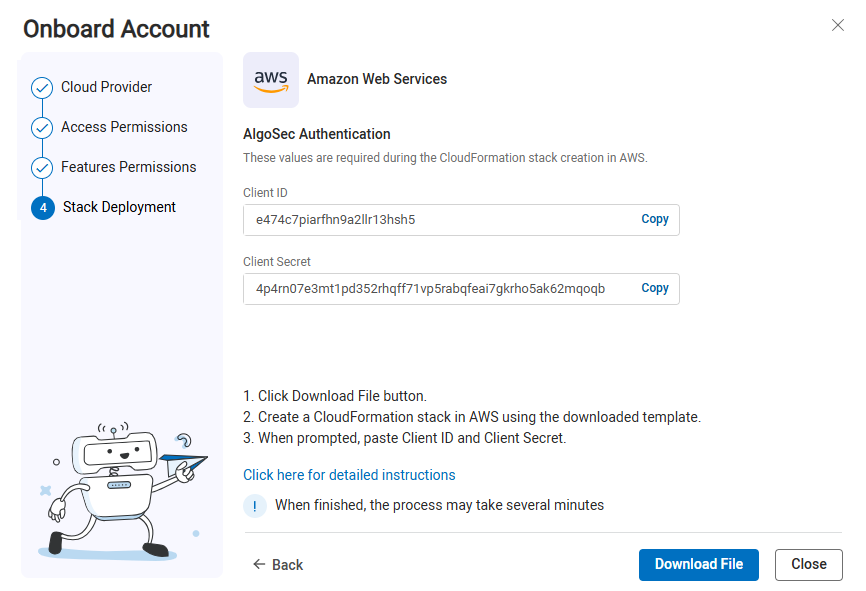
Click Download File. The file is downloaded to your machine. You will use it later in these steps.
-
Copy the Client ID and Client Secret to also be used later in these steps.
-
Click Close to close the wizard.
-
Log in to the AWS Console Home.
-
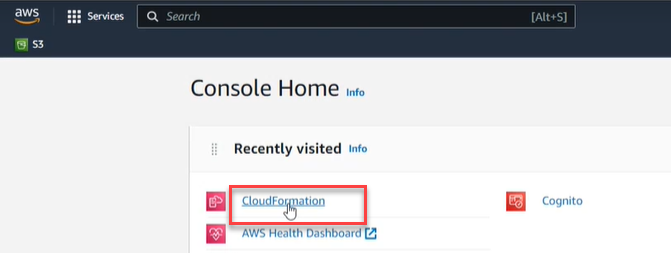
In the AWS Console Home, click CloudFormation.
-
Note: You should deploy only one stack or StackSet per AWS account, even if the account spans multiple regions.
To -
Click Stacks.

-
-
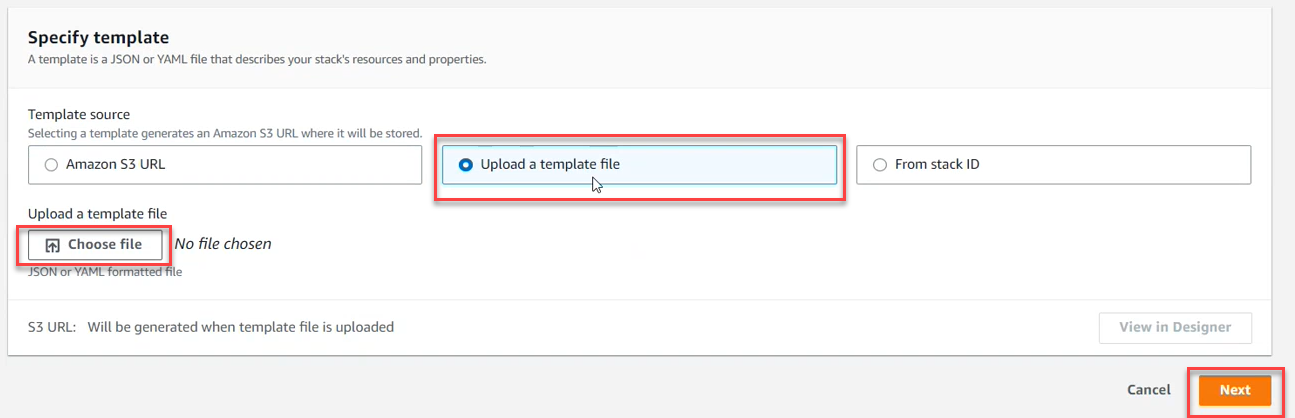
In the Specify Template section, click Upload a Template File. Click Choose file. Browse and select the CloudFormation Template that you downloaded previously. Then click Next.
-
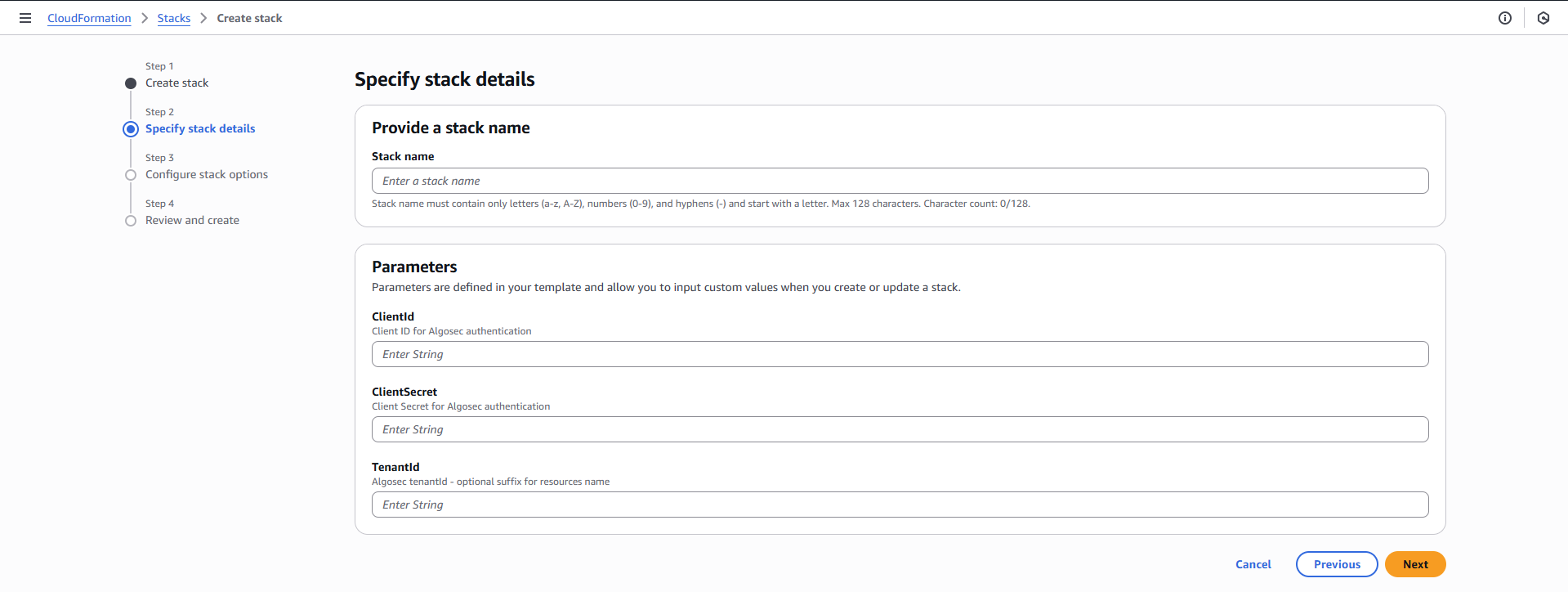
In the Specify Stack details section,
Note: The account name displayed in ACE is initially the AWS account number (ID) of the user who created the Stack (account) in AWS. To edit the account name in ACE, see Edit account details.
-
On the Configure Stack options screen, click Next.

-
Review the Stack. Select I acknowledge that AWS CloudFormation might create IAM resources.

-
Click Submit. It may take several minutes for the Stack to be
To -
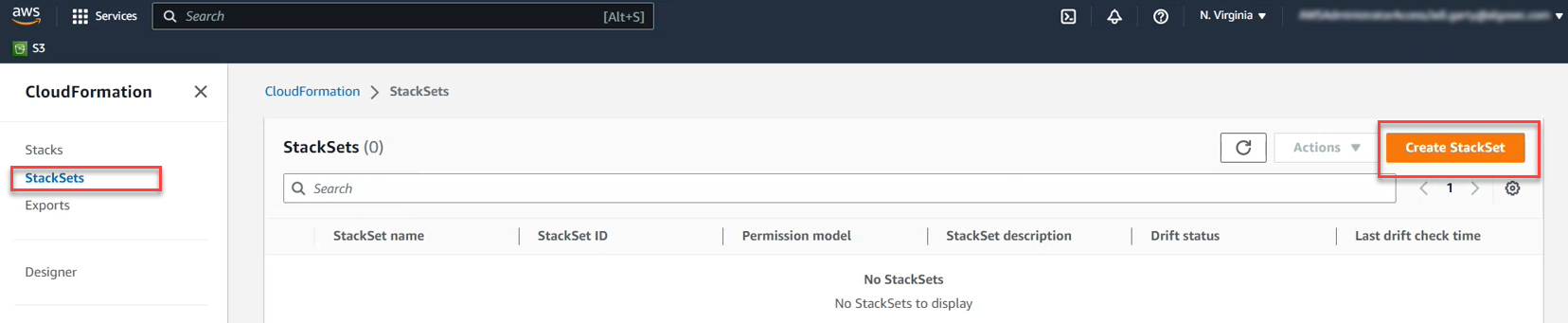
Click Stack Sets.
-
-
In the Specify Template section, click Upload a Template File. Click Choose file. Browse and select the CloudFormation Template that you downloaded previously. Then click Next.
-
In the Specify Stack Set details section,
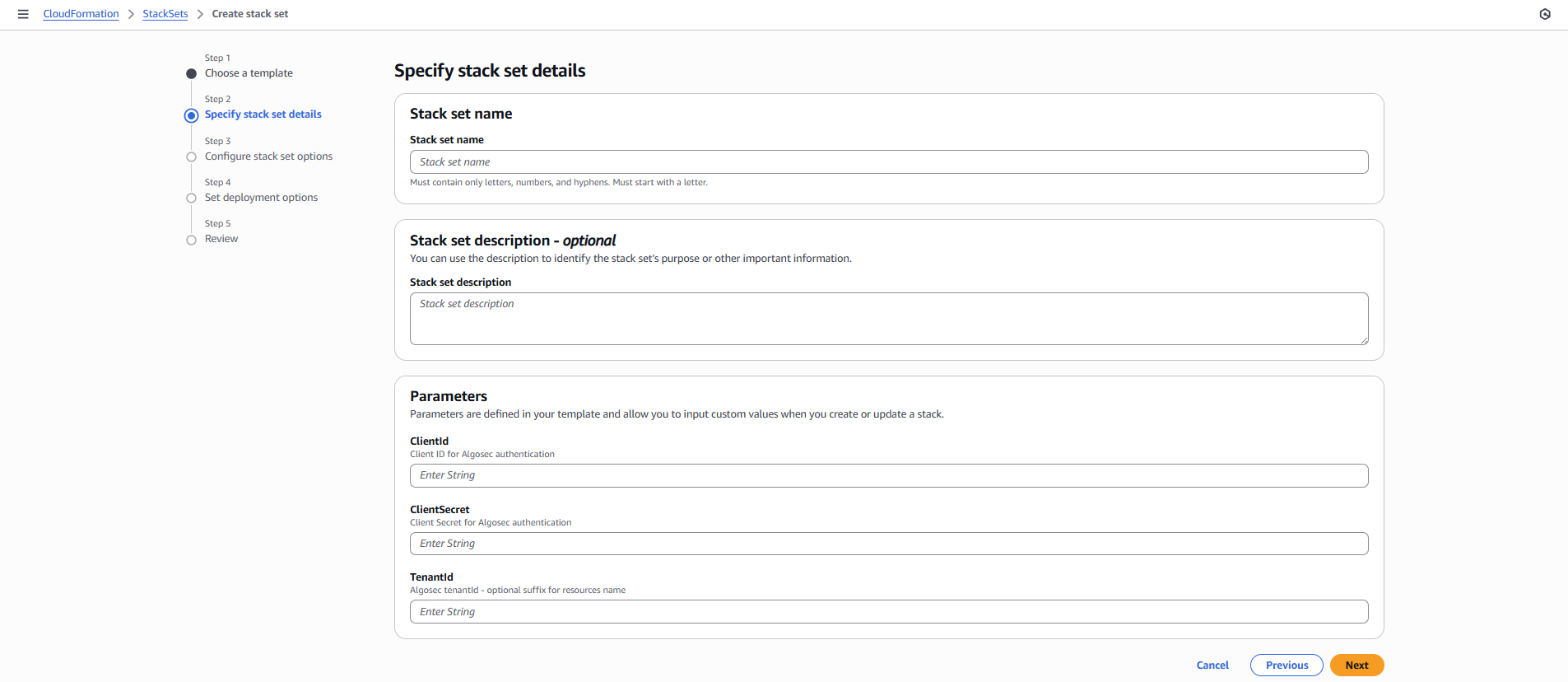
The Configure Stack Set options screen appears.
-
On the Configure Stack Set options screen, click Next.
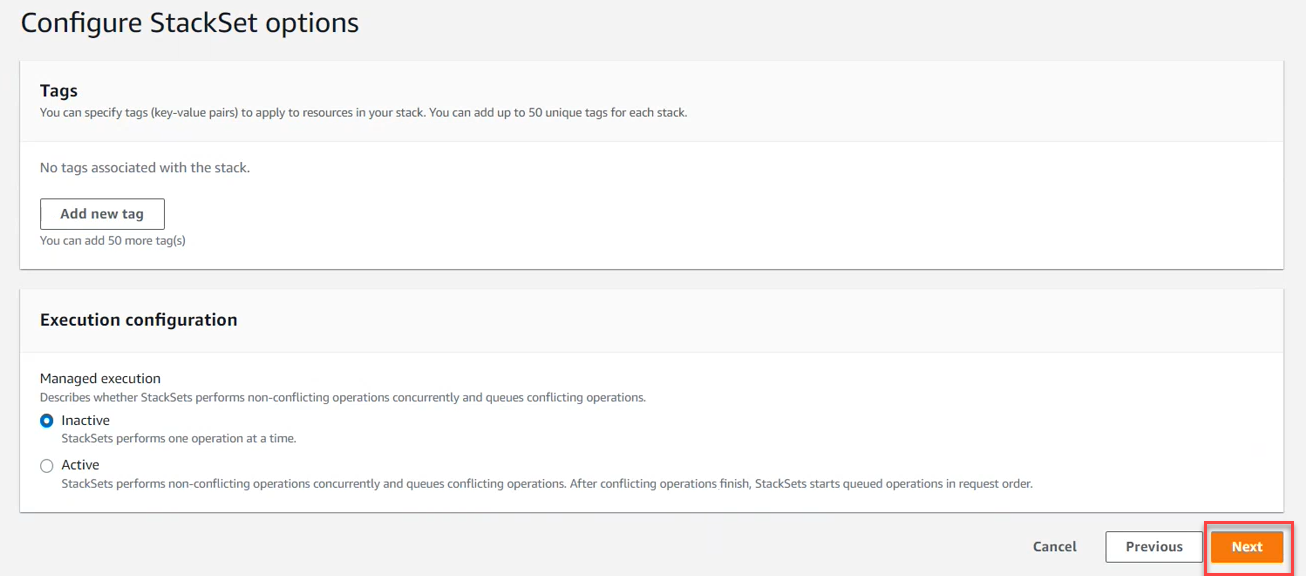
The Set Deployment Options section appears.
-
In Set Deployment Options, click Deploy New Stacks
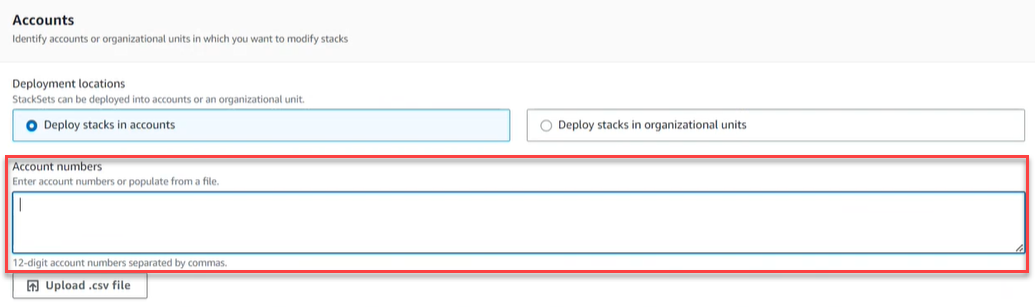
You can deploy stacks across accounts by targeting either your entire organization or specific accounts using organizational units (OUs) and account filter options.
Choose either one of the following:
-
Deploy stacks across accounts by targeting your entire organization:
-
Click Deploy to organization
-
-
Deploy stacks across accounts by targeting specific accounts using organizational units (OUs) and account filter options:
-
Click Deploy to Organizational Units (OUs)
-
Click Add Another OU. Enter an AWS OU ID. Repeat as required.
-
(optional) Select Account Filter Type. For more info, see AWS documentation.
-
Note: The account names displayed in ACE are initially set to the AWS account numbers (ID). To edit the account names in ACE, see Edit account details.
-
-
In the Specify Regions section, select the region(s) where the stacks

-
Set Deployment Options based on the needs and requirements of your system. Then click Next.
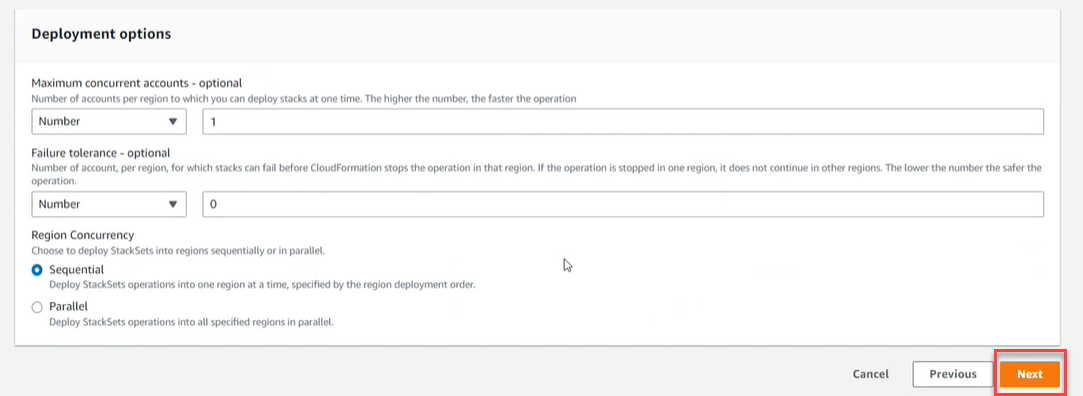
-
Review the StackSet. Select I acknowledge that AWS CloudFormation might create IAM resources.
-
Click Submit. It may take several minutes for the StackSets to be
Tip: You can check the individual stack instances in CloudFormation>Stack Sets as follows.
-
Click the created Stack Set.
-
Click the Stack Instance tab and see which accounts were created and their detailed status.
-
-
Note: For issues onboarding AWS accounts, see Troubleshoot Onboarding.
-
Open Permissions Diagnostics to confirm that the account/subscription/project meets the requirements for the ACE scan types you want to run, and use the remediation links to complete any required setup.
To You can use API calls to add a single AWS account to ACE.
Note: Any changes to an account after onboarding are not synced with ACE. To delete one or more manually added accounts, see Onboard AWS Accounts.
Do the following:
-
adCreate an AWS IAM Role for ACE that includes the required permissions (referenced HERE). For detailed steps on setting up the role, see HERE. After creating the role, copy its ARN roleArn for use in the request.
-
Define your externalId using the following suggested format: algosec-xxxxxxxx-xxxx-xxxx-xxxx-xxxxxxxxxxxx
-
Add AWS AlgoSec Account ID (ALGOSEC_ACCOUNT_ID) to the IAM role Trust relationships with a condition to provide the externalId. Use the ALGOSEC_ACCOUNT_ID based on the region of the AlgoSec environment you are onboarded to as provided HERE.
For example:
Copy{
"Version": "2012-10-17",
"Statement": [
{
"Effect": "Allow",
"Principal": {
"AWS": "arn:aws:iam::<ALGOSEC_ACCOUNT_ID>:root"
},
"Action": "sts:AssumeRole",
"Condition": {
"StringEquals": {
"sts:ExternalId": "algosec-xxxxxxxx-xxxx-xxxx-xxxx-xxxxxxxxxxxx"
}
}
}
]
} -
Manually Add VM permissions (Optional): Add the AWS EC2 scanning IAM permissions to the created IAM role. You can find the permissions under Additional optional permissions.
-
Manually onboard KSPM (Optional): The permissions for Kubernetes scan should be granted at the level of the Cluster. Follow the For Kubernetes Cluster Scan instructions under Additional optional permissions.
-
Manually Onboard CD Mitigation (Optional)
-
PrevasioImagePushHandlerRole (IAM Role)
PrevasioImagePushHandlerRoleis an IAM role assumed by thePrevasioImagePushHandlerFunctionLambda, granting it basic execution permissions.
Do the following:
- Open IAM Console.
- Go to Roles > Click Create role.
- In the Trusted Entity Type field: Choose theAWS service.
- In the Use case dropdown: Choose Lambda.
- Click Next
- Permissions: Attach the policy:AWSLambdaBasicExecutionRole.
- Click Next
- Enter Role name: PrevasioImagePushHandlerRole.
- Click Create role
-
On the AWS CLI, enter:
Copyaws iam create-role \
--role-name PrevasioImagePushHandlerRole \
--assume-role-policy-document '{
"Version": "2012-10-17",
"Statement": [{
"Effect": "Allow",
"Principal": {"Service": "lambda.amazonaws.com"},
"Action": "sts:AssumeRole"
}]
}'
aws iam attach-role-policy \
--role-name PrevasioImagePushHandlerRole \
--policy-arn arn:aws:iam::aws:policy/service-role/AWSLambdaBasicExecutionRole
-
PrevasioECRExclusionsRole (IAM Role)
PrevasioECRExclusionsRoleis an IAM role for thePrevasioECRExclusionsFunctionLambda, granting it basic execution rights and permissions to read and update ECR repository policies.
Do the following:
- Open IAM Console
- Go to Roles > Click Create Role.
- In the Trusted Entity Type field: Choose theAWS service.
- In the Use case dropdown: Choose Lambda.
- Click Next.
- Permissions: Attach: AWSLambdaBasicExecutionRole.
- Click Next.
- Enter Role name: PrevasioECRExclusionsRole.
- Click Create Role.
- Go to the Role Permissions, click Add inline policy.
-
On the JSON tab, enter:
Copy{
"Version": "2012-10-17",
"Statement": [
{
"Effect": "Allow",
"Action": [
"ecr:GetRepositoryPolicy",
"ecr:SetRepositoryPolicy",
"ecr:DescribeRepositories"
],
"Resource": "*"
}
]
} -
Click Review policy, name itPrevasioECRExclusionsPolicy, then click Create Policy
-
On the AWS CLI:
# 1. Create the custom policy
Copyaws iam create-policy \
--policy-name PrevasioECRExclusionsPolicy \
--policy-document '{
"Version": "2012-10-17",
"Statement": [{
"Effect": "Allow",
"Action": [
"ecr:GetRepositoryPolicy",
"ecr:SetRepositoryPolicy",
"ecr:DescribeRepositories"
],
"Resource": "*"
}]
}'# 2. Create the role
Copyaws iam create-role \
--role-name PrevasioECRExclusionsRole \
--assume-role-policy-document '{
"Version": "2012-10-17",
"Statement": [{
"Effect": "Allow",
"Principal": {"Service": "lambda.amazonaws.com"},
"Action": "sts:AssumeRole"
}]
}'# 3. Attach the built-in policy
Copyaws iam attach-role-policy \
--role-name PrevasioECRExclusionsRole \
--policy-arn arn:aws:iam::aws:policy/service-role/AWSLambdaBasicExecutionRole# 4. Attach the custom policy (replace <ACCOUNT_ID> with your AWS account ID)
Copyaws iam attach-role-policy \
--role-name PrevasioECRExclusionsRole \
--policy-arn arn:aws:iam::<ACCOUNT_ID>:policy/PrevasioECRExclusionsPolicy
-
PrevasioECRExclusionsFunction (Lambda Function)
This Lambda function updates ECR repository policies to add App Analyzer IAM roles from access exclusions.
Do the following:
-
Download the Lambda function code from the URL corresponding to your region:
-
US: https://us.app.algosec.com/onboarding/cd_mitigation_ecr_exclusions_function.py
-
EU: https://eu.app.algosec.com/onboarding/cd_mitigation_ecr_exclusions_function.py
-
ANZ: https://anz.app.algosec.com/onboarding/cd_mitigation_ecr_exclusions_function.py
-
IND: https://ind.app.algosec.com/onboarding/cd_mitigation_ecr_exclusions_function.py
-
ME: https://me.app.algosec.com/onboarding/cd_mitigation_ecr_exclusions_function.py
-
UAE: https://uae.app.algosec.com/onboarding/cd_mitigation_ecr_exclusions_function.py
-
SGP: https://sgp.app.algosec.com/onboarding/cd_mitigation_ecr_exclusions_function.py
-
-
Save the code as index.py and zip it as function.zip.
-
Create a lambda function following the steps in either I or II below:
-
-
Click Create function
-
Select the option Author from scratch:
-
Enter the function Name: PrevasioECRExclusionsFunction <TenantId> (replace <TenantId> as needed)
-
Select from the Runtime dropdown: Python 3.11
-
Under Role: select Use existing role and then select PrevasioECRExclusionsRole
-
After the lambda function creation finishes,go to the Code source of the lambda function, andclick Upload from > .zip file > Upload function.zip
-
Set Handler to index.handler
-
Set Memory: 128 MB
-
Set Timeout: 60 seconds
-
Under Configuration > Environment variables, add:
-
Key: algosecRole
-
Value: The role ARN that you have created in step 1.
-
-
For the source code,upload the function.zip you downloaded or created from the above link.
-
Click Create function
-
-
On the AWS CLI, run the following:
Copyaws lambda create-function \
--function-name PrevasioECRExclusionsFunction<TenantId> \
--runtime python3.11 \
--role arn:aws:iam::<ACCOUNT_ID>:role/PrevasioECRExclusionsRole \
--handler index.handler \
--timeout 60 \
--memory-size 128 \
--environment Variables={algosecRole=<AlgosecRoleArn>} \
--zip-file fileb://function.zip
Note: Replace <ACCOUNT_ID>, <TenantId>, <AlgosecRoleArn>, and use the code from the provided link as index.py.
-
-
-
PrevasioImagePushHandlerFunction (Lambda Function)
This Lambda function is triggered when an image is pushed to a repository, and sends a request to App Analyzer to scan the image.
Do the following:
-
Download the Lambda function code from the URL corresponding to your region:
-
US: https://us.app.algosec.com/onboarding/cd_mitigation_image_push_handler_function.py
-
EU: https://eu.app.algosec.com/onboarding/cd_mitigation_image_push_handler_function.py
-
ANZ: https://anz.app.algosec.com/onboarding/cd_mitigation_image_push_handler_function.py
-
IND: https://ind.app.algosec.com/onboarding/cd_mitigation_image_push_handler_function.py
-
ME: https://me.app.algosec.com/onboarding/cd_mitigation_image_push_handler_function.py
-
UAE: https://uae.app.algosec.com/onboarding/cd_mitigation_image_push_handler_function.py
-
SGP: https://sgp.app.algosec.com/onboarding/cd_mitigation_image_push_handler_function.py
-
-
Save the code as
index.pyand zip it asfunction.zip. -
In the downloaded file, replace the following values :
For the value of the <algosaas_host> and <prevasio_host>, use the url for your region:
-
Create a lambda function following the steps in either I or II below:
-
Open the AWS Lambda Console. .
-
Click Create function.
-
Select the option: Author from scratch
-
Enter the function Name:PrevasioImagePushHandlerFunction<TenantId>(replace <TenantId> as needed)
-
Select from the Runtime dropdown:Python 3.11
-
Under Role: select Use existing role and then select PrevasioImagePushHandlerRole
-
After the Lambda function is created, go to Code source, click Upload from > .zip file > Upload
function.zip -
Set Handler to
index.handler -
Set Memory:128 MB
-
Set Timeout:10 seconds
-
ClickCreate function
-
-
On the AWS CLI, run the following:
Copyaws lambda create-function \
--function-name PrevasioImagePushHandlerFunction<TenantId> \
--runtime python3.11 \
--role arn:aws:iam::<ACCOUNT_ID>:role/PrevasioImagePushHandlerRole \
--handler index.handler \
--timeout 10 \
--memory-size 128 \
--zip-file fileb://function.zipNote: Replace <ACCOUNT_ID>, <TenantId>, and use the code from the provided link as index.py.
-
-
-
Onboard Access Key Credentials
- Log in to the AWS Console Home.
- Go to AWS System Manager > Parameter Store, My Parameters tab.
-
Click Create Parameter and create secure string parameters for the following:
-
/algosec/<algosec_tenant_id>/clientId
-
/algosec/<algosec_tenant_id>/clientSecret
In the parameter names, use your Tenant ID where shown (<algosec_tenant_id>).
For the parameter values, get the Client ID and Client Secret by clicking
 on the Onboarding page.
 -
-
PrevasioImagePushedEventBridgeRule (EventBridge Rule)
PrevasioImagePushedEventBridgeRule is an EventBridge rule that listens for successful ECR image push events and triggers the PrevasioImagePushHandlerFunction Lambda function.
Do the following:
-
ClickCreate rule.
-
Enter Rule Name: PrevasioImagePushedEventBridgeRule.
-
Choose Rule with an event pattern as the Rule type.
-
In the Event Pattern section, select Custom pattern (JSON editor) and paste:
Copy{
"source": ["aws.ecr"],
"detail-type": ["ECR Image Action"],
"detail": {
"result": ["SUCCESS"]
}
} -
Under Target:
- Target type:AWS service
- Function:Select PrevasioImagePushHandlerFunction
-
Click Next, review, and click Create rule.
-
On the AWS CLI:
-
Create the rule:
Copyaws events put-rule \
--name PrevasioImagePushedEventBridgeRule \
--event-pattern '{
"source": ["aws.ecr"],
"detail-type": ["ECR Image Action"],
"detail": {"result": ["SUCCESS"]}
}'
aws events put-targets \
  --rule PrevasioImagePushedEventBridgeRule \
--targets '[{"Id": "PrevasioImagePushHandlerFunction<TenantId>", "Arn": "<LambdaFunctionArn>"}]'-
Add the target:
Copyaws events put-targets \
--rule PrevasioImagePushedEventBridgeRule \
--targets '[{"Id": "PrevasioImagePushHandlerFunction<TenantId>", "Arn": "<LambdaFunctionArn>"}]' -
Note: Replace <TenantId> and <LambdaFunctionArn> with your actual values.
-
PrevasioInvokeImagePushHandlerFunctionPermission (Lambda Permission)
PrevasioInvokeImagePushHandlerFunctionPermission is a Lambda permission that allows EventBridge to invoke the PrevasioImagePushHandlerFunction when an event (such as an ECR image push) matches a defined rule.
Do the following:
-
Find the Lambda function:PrevasioImagePushHandlerFunction
-
Open the function and navigate to theConfiguration tab > Permissions
-
Under Resource-based policy, clickAdd permissions > Add permissions to Lambda function
-
Set the following values:
- Principal:
events.amazonaws.com - Action:
lambda:InvokeFunction - Source ARN: Use the ARN of the EventBridge rule that triggers the function
- Principal:
-
On the AWS CLI:
Copyaws lambda add-permission \
--function-name PrevasioImagePushHandlerFunction \
--action lambda:InvokeFunction \
--principal events.amazonaws.com \
--source-arn arn:aws:events:<REGION>:<ACCOUNT_ID>:rule/<RULE_NAME> \
--statement-id AllowEventBridgeInvoke
Note: Replace <REGION>, <ACCOUNT_ID>, and <RULE_NAME> with your actual values.
-
Run PrevasioECRExclusionsFunction
This step executes the PrevasioECRExclusionsFunction Lambda manually to apply ECR access exclusions.
Do the following:
-
Search for and open the function: PrevasioECRExclusionsFunction
-
ClickTest
-
In the test event dialog:
- Enter any name (e.g.,
TestInvoke) - Input the following JSON payload:
Copy
{"RequestType": "Create"} - Click Save
- Enter any name (e.g.,
-
Click Test again to execute the function
-
Review logs and output in the Execution resultspanel
-
On the AWS CLI:
Copyaws lambda invoke \
--function-name PrevasioECRExclusionsFunction \
--payload '{"RequestType": "Create"}' \
response.json
-
-
Onboard the account through the API. For details, refer to the API documentation on adding or editing an AWS account. See Add/edit an AWS account.
-
Open Permissions Diagnostics to confirm that the account/subscription/project meets the requirements for the ACE scan types you want to run, and use the remediation links to complete any required setup.
To You can leverage Terraform, the infrastructure-as-code solution, as another option for onboarding your AWS accounts into ACE.
Prerequisite: Install the Terraform CLI on the machine where you’ll run the commands. For instructions how to do this see Install Terraform .
Do the following:
-
In the ACE
Settings area, click Onboarding. -
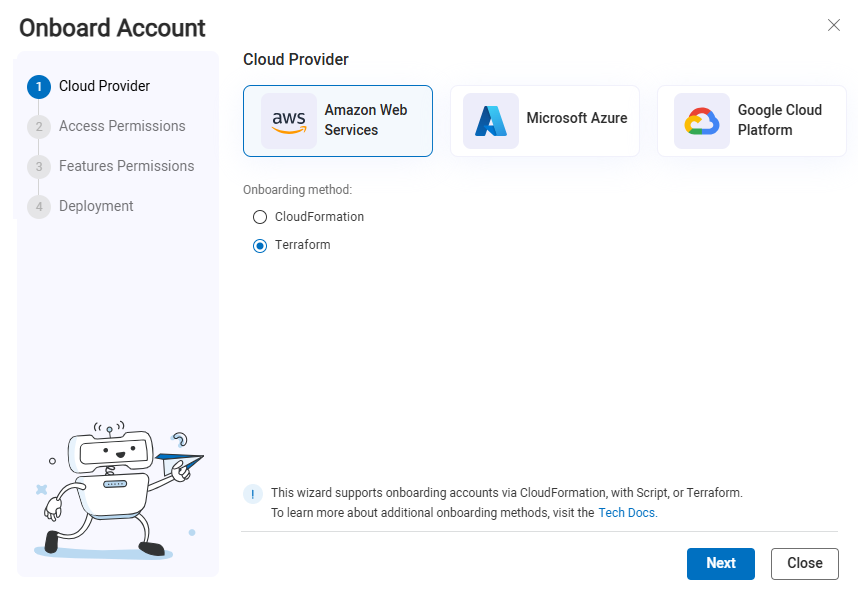
On the Onboarding Management page that opens, click +Onboard Accounts. The Onboard Account Wizard opens.
-
Click the
Amazon Web Services button. -
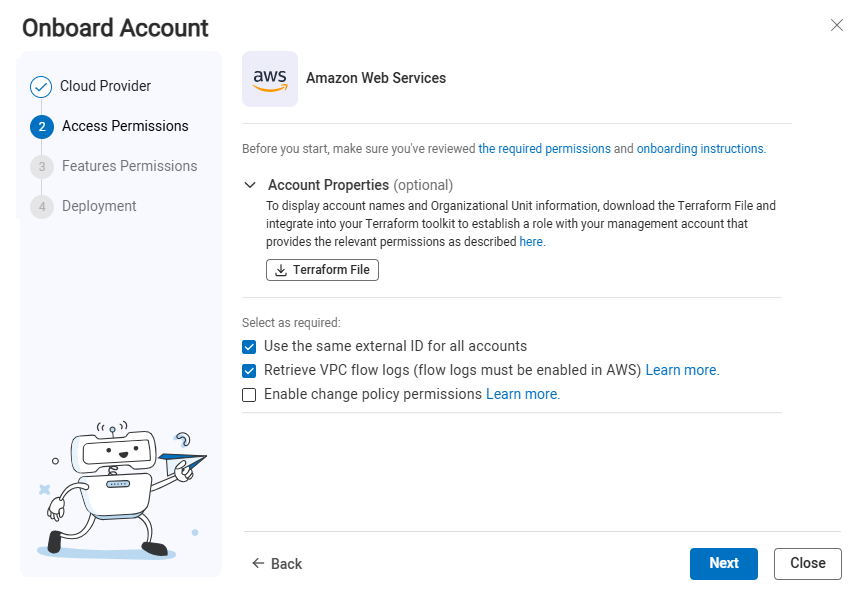
The AWS Onboarding Wizard Access Permissions step opens.
-
(Optional) Account Properties:
Note: The download Terraform File button on this step is tied to Account Management and is different from the file downloaded at the end of the onboarding wizard.
If you plan to onboard multiple AWS accounts and you want to display AWS Account names, Organizational Unit and information about suspended accounts in ACE, it's necessary to establish a role within your management account that grants ACE permissions. See Permissions to display account properties.
-
Click
 and save to a local folder on your computer.
 -
Log on to AWS Console on your management account (with administrative permissions)
-
Upload the Terraform template. (If you are updating an existing terraform template, save the template in the same directory you used to onboard accounts with Terraform, or in the directory that contains your Terraform state file (to learn more about Terraform state, see State).
-
Run:
terraform init
-
Run:
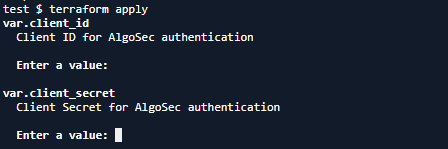
terraform apply -var="tenant_id=<AlgoSec Tenant ID>"
The template is applied and AWS resources and permissions are created.
-
When prompted, enter the Client ID and Client Secret.
Note: To get these values, click Next in the wizard, then click Next again to go to the Deployment step (Step 4). You can copy the required values from that screen.
-
-
Specify the details below; they will be included in the file available for download at the end of the onboarding wizard.
Optional settings Description Use the same external ID for all accounts Select to use the same external ID for all accounts Retrieve VPC Flow Logs Select to retrieve VPC Flow Logs. For more information, see VPC Flow Logs. Enable permissions for policy change AlgoSec only needs READ permissions to provide support for your AWS security policy management. This requirement ensures you can still receive complete security analysis and recommendations while granting the minimal level of access.
Write permissions can optionally be added for advanced policy change capabilities.
-
Unselect to fully support your AWS security policy management, security analysis and recommendations. For more information, see Permissions Required for AWS Accounts.
-
Select for advanced policy change capabilities:
-
Base Read permissions, as described in AWS permissions and justifications,
-
Additional Write permissions, outlined in Additional permissions for optional features.
-
-
-
Click Next. The Features Permissions step of the wizard opens.
-
Onboard VM Scanning (optional)
The VM Scanner feature enables scanning Elastic Block Store (EBS) volumes attached to EC2 instances across multiple regions in an AWS account. ACE Cloud App Analyzer's VM Scanner enhances cloud workload security by providing agentless scanning for AWS EC2 instances that have volumes attached. For more information, see Enable Virtual Machine Security (AWS).
-
Select Grant required permissions to the IAM role to automatically add permissions to EC2 instances security to the IAM role. For a list of permissions that are added see Permissions Required for AWS Accounts.
-
If you choose not to grant permissions in the wizard, you can always manually set permissions to the IAM role enabling EC2 instances scanning later. See Manually add VM scanning permissionsManually add VM scanning permissions.
-
-
Onboard Kubernetes Scanning (optional)
Cloud App Analyzer provides agentless discovery and detection of vulnerabilities, compliance, and configuration risks for Kubernetes components. For more information, see Kubernetes Services Risks Management.
-
Select Create additional resources in the AWS account to be automatically onboarded. For information related to automatic onboarding, see Kubernetes Security Automatic onboarding.
-
If you choose not to create additional resources in the wizard, you can always onboarded manually later. For instructions for manual onboarding, see Kubernetes Security Manual onboarding.
-
-
Onboard CD Mitigation (optional)
The CD Mitigation feature provides threat management for AWS Elastic Container Registry (ECR) by scanning and securing your Continuous Delivery (CD) pipeline, preventing threats from reaching container-based workloads.
-
Select Grant CD mitigation permissions & create related resources to be automatically onboarded.
-
If you choose not to Grant CD mitigation permissions & create related resources in the wizard, you can always onboard manually later.
-
-
Run the AWS CLI in AWS CloudShell or from your local machine.
-
If running from you local machine:
-
Login to your AWS account.
-
Set region environment parameter.
-
-
Upload the Terraform file to a directory of your choice. (If you are updating an existing terraform template, save the template in the same directory you used to onboard accounts with Terraform, or in the directory that contains your Terraform state file (to learn more about Terraform state, see State).
-
In that directory, run:
terraform init
-
Run one of the following:
-
To apply with a tenant ID: (this associates your tenant ID with all created resources)
terraform apply -var="tenant_id=<AlgoSec Tenant ID>"
-
To apply without a tenant ID:
terraform apply
-
-
When prompted, enter the Client ID and Client Secret.
-
When prompted to approve the changes, type Yes and press Enter. Terraform resources and permissions are updated.
-
Open Permissions Diagnostics to confirm that the account/subscription/project meets the requirements for the ACE scan types you want to run, and use the remediation links to complete any required setup.
Permissions required for AWS roles
See Permissions Required for AWS Accounts.
VPC Flow Logs
Tip: For background about VPC Flow Logs, see these: AWS Article: VPC Flow Logs, AWS Blog: VPC Flow Logs.
By enabling VPC Flow Logs, ACE can retrieve and analyze network traffic data for multiple purposes.
-
For ACE Cloud Network Security, flow logs are used to determine when security group (SG) rules were last exercised. This data is surfaced in the Risk Triggers and Network Policy pages, allowing you to identify stale, over-permissive, or unused rules and confidently clean up your network policies. For more details, see Last used and Clean Up Policies
-
In addition, ACE Cloud App Analyzer uses VPC Flow Logs to observe established traffic patterns between services. This enables ACE to accurately merge microservices based on real communication paths, resulting in more precise application discovery.
Follow the steps in Enable AWS VPC flow logging to get started.
Notes:
(1) Allow up to 24 hours for relevant rule usage information to be displayed when enabling flow logs for the first time and when adding accounts that already had flow logs enabled.
(2) VPC flow logs can be stored on either S3 or CloudWatch. ACE supports collecting flow logs from either option.
(3) ACE supports processing flow logs only when they are stored in the default log format. More details in this AWS article.
(4) If you configure both S3 and CloudWatch as your VPC Flow Logs targets, ACE will collect only from the S3 buckets.
(5) ACE collects only VPC Flow Logs of traffic type “accept”. Make sure that you configure the VPC Flow Logs traffic type to either “Accepted traffic” or “All traffic” (more details in this AWS article)
Enable AWS VPC flow logging
ACE can work with flow logging enabled at the various levels that AWS allows: VPC, Subnet, Network Interfaces.
Do the following:
To provide optimal performance, the following procedure explains how to enable flow logging at the Network Interface level. Repeat it for each Network Interface requiring flow logging.
-
Enabled Flow Logs in AWS.
Note for shared VPCs:
-
To support flow logs defined on the VPC level, the AWS owner account must have at least a single Network Interface (NIC) defined on the shared VPC.
-
To support flow logs defined on the Subnet level, the AWS owner account must have at least a single Network Interface (NIC) defined on the shared VPC Subnet.
These instructions rely on the creation of an S3 (Simple Storage Service) bucket and configuring VPC Flow Logs to store on it. If you want to create cross account flow logs provide additional permissions to your S3 bucket, as explained below.
Do the following:
-
Enter your AWS account and open the AWS Management Console.
- In the Storage Section, click on S3.
- Click the Create Bucket button.
- In the dialog that is displayed:
- Enter a DNS compliant name for the S3 Bucket.
- Verify that the correct region is selected.
- Click Next.
Continue clicking Next until you see the Create Bucket button at the bottom right of your screen.
Note: By clicking Next until now, you have skipped parameters that do not require changes. The S3 Buckets page you just created is displayed.
-
(Optional) To create cross account flow logs, provide additional permissions to your S3 bucket, see AWS documentation.
- Click on your S3 Bucket name.
On the right, a panel displays the properties of this S3 bucket, permissions and management details. At the top is the Copy Bucket ARN button. -
Click the Copy Bucket ARN button.
The ARN(Amazon Resource Name) is now in your copy buffer. You will use it soon.
Important: Be sure not to copy anything else into your copy buffer until you are asked to paste this into a field in one of the last steps of this procedure.
- From the main AWS page, in the Compute section, click EC2.
- On the EC2 dashboard that is displayed, in the left panel Network and Security section, click on Network Interfaces.
A list of Network Interfaces is displayed. - Select a network interface on which you wish to enable flow logging.
- Under the network interface list, click the Flow Logs tab.
- Click the Create flow log button.
- In the Create flow log page that is displayed:
- Select Accept from the Filter dropdown list to indicate that only Accepted Traffic should be collected.
- For the Maximum aggregation interval select 10 minutes.
- For Destination, select Send to S3 Bucket.
- In the ARN field, paste the ARN that you copied in Step #7, above. It should still be in your copy buffer.
- Click Create at the bottom of the page.
- Optional: View your new flow log:
- Go to the Network Interfaces list
- Select the Network Interface for which you created the Flow Log.
- Click Flow Logs tab under the Network Interface List.
- In the Destination Tabs column, click the name of your S3 Bucket.
-
Configure this role trust relationship:
{ "Version": "2012-10-17", "Statement": [ { "Sid": "", "Effect": "Allow", "Principal": { "Service": "vpc-flow-logs.amazonaws.com" }, "Action": "sts:AssumeRole" } ] } -
Configure the following role permissions:
{
  "Version": "2012-10-17",
  "Statement": [
    {
      "Sid": "",
      "Effect": "Allow",
      "Principal": {
        "Service": "vpc-flow-logs.amazonaws.com"
      },
      "Action": "sts:AssumeRole"
    }
  ]
}
Note: For info about required permissions see Permissions Required for AWS Accounts.
You must configure both of the elements below to store VPC Flow Logs in CloudWatch. See this AWS article for more details.
Modify the following parameters as needed:
Parameter Description TRAFFIC_LOG_FREQUENCY_PERIOD_MINUTES
Determines the frequency, in minutes, at which ACE collects traffic logs from AWS SGs.
Value: Integer
Default: 60
ENABLE_TRAFFIC_LOGS Determines whether traffic log collection is enabled for AWS SGs.
Disabling this parameter will cause ACE to display Flow logs disabled in the Last used column on the risk trigger details pages, even when flow logging is enabled in the AWS SG itself.
Value: Boolean
Default: Enabled
INACTIVE_RULE_PERIOD Determines the number of days counting back from current day for which ACE checks flow logs for unused rules.
Range = 1 to 365 days
Default = 30
If flow logs were enabled, available and collected byACE for the entire period, SG Rules that did not have a single hit during the period are by definition unused rules.
In the Last used column, unused rules are marked as No traffic logged.
For details, see Last used.
Note: This parameter can also be configured in the Network Policies web interface, when selecting the “Unused rules” cleanup view.
To modify any of these parameters, contact AlgoSec support.
-
Update details of onboarded AWS accounts
You can update the details for AWS resources already onboarded to ACE. This is helpful if you need to add or remove write permissions.
Do the following:
Note: If you have licenses for both Cloud Network Security (CNS) and Cloud App Analyzer (CAA) but want to deploy only CNS in AWS, refer to this KB article for the correct CNS-only onboarding steps.
-
In the ACE
Settings area, click Onboarding. -
On the Onboarding Management page that opens, click +Onboard Accounts. The Onboard Account Wizard opens.
-
Click the
Amazon Web Services button. -
The AWS Onboarding Wizard Access Permissions step opens.
-
(Optional) Account Properties:
Note: The download CloudFormation File button on this step is tied to Account Management and is different from the file downloaded at the end of the onboarding wizard.
If you plan to onboard multiple AWS accounts and you want to display AWS Account names, Organizational Unit and information about suspended accounts in ACE, it's necessary to establish a role within your management account that grants ACE permissions. See Permissions to display account properties.
-
Click
and save to a local folder on your computer. -
Log on to AWS Console on your management account (with administrative permissions)
-
Follow the steps in the AWS documentation
.
-
-
Specify the details below; they will be included in the file available for download at the end of the onboarding wizard.
Optional settings Description Use the same external ID for all accounts Select to use the same external ID for all accounts Retrieve VPC Flow Logs Select to retrieve VPC Flow Logs. For more information, see VPC Flow Logs. Enable permissions for policy change AlgoSec only needs READ permissions to provide support for your AWS security policy management. This requirement ensures you can still receive complete security analysis and recommendations while granting the minimal level of access.
Write permissions can optionally be added for advanced policy change capabilities.
-
Unselect to fully support your AWS security policy management, security analysis and recommendations. For more information, see Permissions Required for AWS Accounts.
-
Select for advanced policy change capabilities:
-
Base Read permissions, as described in AWS permissions and justifications,
-
Additional Write permissions, outlined in Additional permissions for optional features.
-
-
-
Click Next. The Features Permissions step of the wizard opens.
-
Onboard VM Scanning (optional)
The VM Scanner feature enables scanning Elastic Block Store (EBS) volumes attached to EC2 instances across multiple regions in an AWS account. ACE Cloud App Analyzer's VM Scanner enhances cloud workload security by providing agentless scanning for AWS EC2 instances that have volumes attached. For more information, see Enable Virtual Machine Security (AWS).
-
Select Grant required permissions to the IAM role to automatically add permissions to EC2 instances security to the IAM role. For a list of permissions that are added see Permissions Required for AWS Accounts.
-
If you choose not to grant permissions in the wizard, you can always manually set permissions to the IAM role enabling EC2 instances scanning later. See Manually add VM scanning permissionsManually add VM scanning permissions.
-
-
Onboard Kubernetes Scanning (optional)
Cloud App Analyzer provides agentless discovery and detection of vulnerabilities, compliance, and configuration risks for Kubernetes components. For more information, see Kubernetes Services Risks Management.
-
Select Create additional resources in the AWS account to be automatically onboarded. For information related to automatic onboarding, see Kubernetes Security Automatic onboarding.
-
If you choose not to create additional resources in the wizard, you can always onboarded manually later. For instructions for manual onboarding, see Kubernetes Security Manual onboarding.
-
-
Onboard CD Mitigation (optional)
The CD Mitigation feature provides threat management for AWS Elastic Container Registry (ECR) by scanning and securing your Continuous Delivery (CD) pipeline, preventing threats from reaching container-based workloads.
-
Select Grant CD mitigation permissions & create related resources to be automatically onboarded.
-
If you choose not to Grant CD mitigation permissions & create related resources in the wizard, you can always onboard manually later.
-
-
Click Next. The Deployment step of the wizard opens.
-
Click Download File. The file is downloaded to your machine. You will use it later in these steps.
-
Copy the Client ID and Client Secret to also be used later in these steps.
-
Click Close to close the wizard.
-
Log in to the AWS Console Home.
-
In the AWS Console Home, click CloudFormation.
-
Note: You should deploy only one stack or StackSet per AWS account, even if the account spans multiple regions.
To -
Click Stacks.
-
-
In the Specify Template section, click Upload a Template File. Click Choose file. Browse and select the CloudFormation Template that you downloaded previously. Then click Next.
-
In the Specify Stack details section,
Note: The account name displayed in ACE is initially the AWS account number (ID) of the user who created the Stack (account) in AWS. To edit the account name in ACE, see Edit account details.
-
On the Configure Stack options screen, click Next.
-
Review the Stack. Select I acknowledge that AWS CloudFormation might create IAM resources.
-
Click Submit. It may take several minutes for the Stack to be
To -
Click Stack Sets.
-
-
In the Specify Template section, click Upload a Template File. Click Choose file. Browse and select the CloudFormation Template that you downloaded previously. Then click Next.
-
In the Specify Stack Set details section,
The Configure Stack Set options screen appears.
-
On the Configure Stack Set options screen, click Next.
The Set Deployment Options section appears.
-
In Set Deployment Options, click Deploy New Stacks
You can deploy stacks across accounts by targeting either your entire organization or specific accounts using organizational units (OUs) and account filter options.
Choose either one of the following:
-
Deploy stacks across accounts by targeting your entire organization:
-
Click Deploy to organization
-
-
Deploy stacks across accounts by targeting specific accounts using organizational units (OUs) and account filter options:
-
Click Deploy to Organizational Units (OUs)
-
Click Add Another OU. Enter an AWS OU ID. Repeat as required.
-
(optional) Select Account Filter Type. For more info, see AWS documentation.
-
Note: The account names displayed in ACE are initially set to the AWS account numbers (ID). To edit the account names in ACE, see Edit account details.
-
-
In the Specify Regions section, select the region(s) where the stacks
-
Set Deployment Options based on the needs and requirements of your system. Then click Next.
-
Review the StackSet. Select I acknowledge that AWS CloudFormation might create IAM resources.
-
Click Submit. It may take several minutes for the StackSets to be
Tip: You can check the individual stack instances in CloudFormation>Stack Sets as follows.
-
Click the created Stack Set.
-
Click the Stack Instance tab and see which accounts were created and their detailed status.
-
-
Note: For issues onboarding AWS accounts, see Troubleshoot Onboarding.
-
Open Permissions Diagnostics to confirm that the account/subscription/project meets the requirements for the ACE scan types you want to run, and use the remediation links to complete any required setup.
To Do the following:
-
adCreate an AWS IAM Role for ACE that includes the required permissions (referenced HERE). For detailed steps on setting up the role, see HERE. After creating the role, copy its ARN roleArn for use in the request.
-
Define your externalId using the following suggested format: algosec-xxxxxxxx-xxxx-xxxx-xxxx-xxxxxxxxxxxx
-
Add AWS AlgoSec Account ID (ALGOSEC_ACCOUNT_ID) to the IAM role Trust relationships with a condition to provide the externalId. Use the ALGOSEC_ACCOUNT_ID based on the region of the AlgoSec environment you are onboarded to as provided HERE.
For example:
Copy{
"Version": "2012-10-17",
"Statement": [
{
"Effect": "Allow",
"Principal": {
"AWS": "arn:aws:iam::<ALGOSEC_ACCOUNT_ID>:root"
},
"Action": "sts:AssumeRole",
"Condition": {
"StringEquals": {
"sts:ExternalId": "algosec-xxxxxxxx-xxxx-xxxx-xxxx-xxxxxxxxxxxx"
}
}
}
]
} -
Manually Add VM permissions (Optional): Add the AWS EC2 scanning IAM permissions to the created IAM role. You can find the permissions under Additional optional permissions.
-
Manually onboard KSPM (Optional): The permissions for Kubernetes scan should be granted at the level of the Cluster. Follow the For Kubernetes Cluster Scan instructions under Additional optional permissions.
-
Manually Onboard CD Mitigation (Optional)
-
PrevasioImagePushHandlerRole (IAM Role)
PrevasioImagePushHandlerRoleis an IAM role assumed by thePrevasioImagePushHandlerFunctionLambda, granting it basic execution permissions.
Do the following:
- Open IAM Console.
- Go to Roles > Click Create role.
- In the Trusted Entity Type field: Choose theAWS service.
- In the Use case dropdown: Choose Lambda.
- Click Next
- Permissions: Attach the policy:AWSLambdaBasicExecutionRole.
- Click Next
- Enter Role name: PrevasioImagePushHandlerRole.
- Click Create role
-
On the AWS CLI, enter:
Copyaws iam create-role \
--role-name PrevasioImagePushHandlerRole \
--assume-role-policy-document '{
"Version": "2012-10-17",
"Statement": [{
"Effect": "Allow",
"Principal": {"Service": "lambda.amazonaws.com"},
"Action": "sts:AssumeRole"
}]
}'
aws iam attach-role-policy \
--role-name PrevasioImagePushHandlerRole \
--policy-arn arn:aws:iam::aws:policy/service-role/AWSLambdaBasicExecutionRole
-
PrevasioECRExclusionsRole (IAM Role)
PrevasioECRExclusionsRoleis an IAM role for thePrevasioECRExclusionsFunctionLambda, granting it basic execution rights and permissions to read and update ECR repository policies.
Do the following:
- Open IAM Console
- Go to Roles > Click Create Role.
- In the Trusted Entity Type field: Choose theAWS service.
- In the Use case dropdown: Choose Lambda.
- Click Next.
- Permissions: Attach: AWSLambdaBasicExecutionRole.
- Click Next.
- Enter Role name: PrevasioECRExclusionsRole.
- Click Create Role.
- Go to the Role Permissions, click Add inline policy.
-
On the JSON tab, enter:
Copy{
"Version": "2012-10-17",
"Statement": [
{
"Effect": "Allow",
"Action": [
"ecr:GetRepositoryPolicy",
"ecr:SetRepositoryPolicy",
"ecr:DescribeRepositories"
],
"Resource": "*"
}
]
} -
Click Review policy, name itPrevasioECRExclusionsPolicy, then click Create Policy
-
On the AWS CLI:
# 1. Create the custom policy
Copyaws iam create-policy \
--policy-name PrevasioECRExclusionsPolicy \
--policy-document '{
"Version": "2012-10-17",
"Statement": [{
"Effect": "Allow",
"Action": [
"ecr:GetRepositoryPolicy",
"ecr:SetRepositoryPolicy",
"ecr:DescribeRepositories"
],
"Resource": "*"
}]
}'# 2. Create the role
Copyaws iam create-role \
--role-name PrevasioECRExclusionsRole \
--assume-role-policy-document '{
"Version": "2012-10-17",
"Statement": [{
"Effect": "Allow",
"Principal": {"Service": "lambda.amazonaws.com"},
"Action": "sts:AssumeRole"
}]
}'# 3. Attach the built-in policy
Copyaws iam attach-role-policy \
--role-name PrevasioECRExclusionsRole \
--policy-arn arn:aws:iam::aws:policy/service-role/AWSLambdaBasicExecutionRole# 4. Attach the custom policy (replace <ACCOUNT_ID> with your AWS account ID)
Copyaws iam attach-role-policy \
--role-name PrevasioECRExclusionsRole \
--policy-arn arn:aws:iam::<ACCOUNT_ID>:policy/PrevasioECRExclusionsPolicy
-
PrevasioECRExclusionsFunction (Lambda Function)
This Lambda function updates ECR repository policies to add App Analyzer IAM roles from access exclusions.
Do the following:
-
Download the Lambda function code from the URL corresponding to your region:
-
US: https://us.app.algosec.com/onboarding/cd_mitigation_ecr_exclusions_function.py
-
EU: https://eu.app.algosec.com/onboarding/cd_mitigation_ecr_exclusions_function.py
-
ANZ: https://anz.app.algosec.com/onboarding/cd_mitigation_ecr_exclusions_function.py
-
IND: https://ind.app.algosec.com/onboarding/cd_mitigation_ecr_exclusions_function.py
-
ME: https://me.app.algosec.com/onboarding/cd_mitigation_ecr_exclusions_function.py
-
UAE: https://uae.app.algosec.com/onboarding/cd_mitigation_ecr_exclusions_function.py
-
SGP: https://sgp.app.algosec.com/onboarding/cd_mitigation_ecr_exclusions_function.py
-
-
Save the code as index.py and zip it as function.zip.
-
Create a lambda function following the steps in either I or II below:
-
-
Click Create function
-
Select the option Author from scratch:
-
Enter the function Name: PrevasioECRExclusionsFunction <TenantId> (replace <TenantId> as needed)
-
Select from the Runtime dropdown: Python 3.11
-
Under Role: select Use existing role and then select PrevasioECRExclusionsRole
-
After the lambda function creation finishes,go to the Code source of the lambda function, andclick Upload from > .zip file > Upload function.zip
-
Set Handler to index.handler
-
Set Memory: 128 MB
-
Set Timeout: 60 seconds
-
Under Configuration > Environment variables, add:
-
Key: algosecRole
-
Value: The role ARN that you have created in step 1.
-
-
For the source code,upload the function.zip you downloaded or created from the above link.
-
Click Create function
-
-
On the AWS CLI, run the following:
Copyaws lambda create-function \
--function-name PrevasioECRExclusionsFunction<TenantId> \
--runtime python3.11 \
--role arn:aws:iam::<ACCOUNT_ID>:role/PrevasioECRExclusionsRole \
--handler index.handler \
--timeout 60 \
--memory-size 128 \
--environment Variables={algosecRole=<AlgosecRoleArn>} \
--zip-file fileb://function.zip
Note: Replace <ACCOUNT_ID>, <TenantId>, <AlgosecRoleArn>, and use the code from the provided link as index.py.
-
-
-
PrevasioImagePushHandlerFunction (Lambda Function)
This Lambda function is triggered when an image is pushed to a repository, and sends a request to App Analyzer to scan the image.
Do the following:
-
Download the Lambda function code from the URL corresponding to your region:
-
US: https://us.app.algosec.com/onboarding/cd_mitigation_image_push_handler_function.py
-
EU: https://eu.app.algosec.com/onboarding/cd_mitigation_image_push_handler_function.py
-
ANZ: https://anz.app.algosec.com/onboarding/cd_mitigation_image_push_handler_function.py
-
IND: https://ind.app.algosec.com/onboarding/cd_mitigation_image_push_handler_function.py
-
ME: https://me.app.algosec.com/onboarding/cd_mitigation_image_push_handler_function.py
-
UAE: https://uae.app.algosec.com/onboarding/cd_mitigation_image_push_handler_function.py
-
SGP: https://sgp.app.algosec.com/onboarding/cd_mitigation_image_push_handler_function.py
-
-
Save the code as
index.pyand zip it asfunction.zip. -
In the downloaded file, replace the following values :
For the value of the <algosaas_host> and <prevasio_host>, use the url for your region:
-
Create a lambda function following the steps in either I or II below:
-
Open the AWS Lambda Console. .
-
Click Create function.
-
Select the option: Author from scratch
-
Enter the function Name:PrevasioImagePushHandlerFunction<TenantId>(replace <TenantId> as needed)
-
Select from the Runtime dropdown:Python 3.11
-
Under Role: select Use existing role and then select PrevasioImagePushHandlerRole
-
After the Lambda function is created, go to Code source, click Upload from > .zip file > Upload
function.zip -
Set Handler to
index.handler -
Set Memory:128 MB
-
Set Timeout:10 seconds
-
ClickCreate function
-
-
On the AWS CLI, run the following:
Copyaws lambda create-function \
--function-name PrevasioImagePushHandlerFunction<TenantId> \
--runtime python3.11 \
--role arn:aws:iam::<ACCOUNT_ID>:role/PrevasioImagePushHandlerRole \
--handler index.handler \
--timeout 10 \
--memory-size 128 \
--zip-file fileb://function.zipNote: Replace <ACCOUNT_ID>, <TenantId>, and use the code from the provided link as index.py.
-
-
-
Onboard Access Key Credentials
- Log in to the AWS Console Home.
- Go to AWS System Manager > Parameter Store, My Parameters tab.
-
Click Create Parameter and create secure string parameters for the following:
-
/algosec/<algosec_tenant_id>/clientId
-
/algosec/<algosec_tenant_id>/clientSecret
In the parameter names, use your Tenant ID where shown (<algosec_tenant_id>).
For the parameter values, get the Client ID and Client Secret by clicking
on the Onboarding page. -
-
PrevasioImagePushedEventBridgeRule (EventBridge Rule)
PrevasioImagePushedEventBridgeRule is an EventBridge rule that listens for successful ECR image push events and triggers the PrevasioImagePushHandlerFunction Lambda function.
Do the following:
-
ClickCreate rule.
-
Enter Rule Name: PrevasioImagePushedEventBridgeRule.
-
Choose Rule with an event pattern as the Rule type.
-
In the Event Pattern section, select Custom pattern (JSON editor) and paste:
Copy{
"source": ["aws.ecr"],
"detail-type": ["ECR Image Action"],
"detail": {
"result": ["SUCCESS"]
}
} -
Under Target:
- Target type:AWS service
- Function:Select PrevasioImagePushHandlerFunction
-
Click Next, review, and click Create rule.
-
On the AWS CLI:
-
Create the rule:
Copyaws events put-rule \
--name PrevasioImagePushedEventBridgeRule \
--event-pattern '{
"source": ["aws.ecr"],
"detail-type": ["ECR Image Action"],
"detail": {"result": ["SUCCESS"]}
}'
aws events put-targets \
  --rule PrevasioImagePushedEventBridgeRule \
--targets '[{"Id": "PrevasioImagePushHandlerFunction<TenantId>", "Arn": "<LambdaFunctionArn>"}]'-
Add the target:
Copyaws events put-targets \
--rule PrevasioImagePushedEventBridgeRule \
--targets '[{"Id": "PrevasioImagePushHandlerFunction<TenantId>", "Arn": "<LambdaFunctionArn>"}]' -
Note: Replace <TenantId> and <LambdaFunctionArn> with your actual values.
-
PrevasioInvokeImagePushHandlerFunctionPermission (Lambda Permission)
PrevasioInvokeImagePushHandlerFunctionPermission is a Lambda permission that allows EventBridge to invoke the PrevasioImagePushHandlerFunction when an event (such as an ECR image push) matches a defined rule.
Do the following:
-
Find the Lambda function:PrevasioImagePushHandlerFunction
-
Open the function and navigate to theConfiguration tab > Permissions
-
Under Resource-based policy, clickAdd permissions > Add permissions to Lambda function
-
Set the following values:
- Principal:
events.amazonaws.com - Action:
lambda:InvokeFunction - Source ARN: Use the ARN of the EventBridge rule that triggers the function
- Principal:
-
On the AWS CLI:
Copyaws lambda add-permission \
--function-name PrevasioImagePushHandlerFunction \
--action lambda:InvokeFunction \
--principal events.amazonaws.com \
--source-arn arn:aws:events:<REGION>:<ACCOUNT_ID>:rule/<RULE_NAME> \
--statement-id AllowEventBridgeInvoke
Note: Replace <REGION>, <ACCOUNT_ID>, and <RULE_NAME> with your actual values.
-
Run PrevasioECRExclusionsFunction
This step executes the PrevasioECRExclusionsFunction Lambda manually to apply ECR access exclusions.
Do the following:
-
Search for and open the function: PrevasioECRExclusionsFunction
-
ClickTest
-
In the test event dialog:
- Enter any name (e.g.,
TestInvoke) - Input the following JSON payload:
Copy
{"RequestType": "Create"} - Click Save
- Enter any name (e.g.,
-
Click Test again to execute the function
-
Review logs and output in the Execution resultspanel
-
On the AWS CLI:
Copyaws lambda invoke \
--function-name PrevasioECRExclusionsFunction \
--payload '{"RequestType": "Create"}' \
response.json
-
-
Onboard the account through the API. For details, refer to the API documentation on adding or editing an AWS account. See Add/edit an AWS account.
-
Open Permissions Diagnostics to confirm that the account/subscription/project meets the requirements for the ACE scan types you want to run, and use the remediation links to complete any required setup.
To Do the following:
-
In the ACE
Settings area, click Onboarding. -
On the Onboarding Management page that opens, click +Onboard Accounts. The Onboard Account Wizard opens.
-
Click the
Amazon Web Services button. -
The AWS Onboarding Wizard Access Permissions step opens.
-
(Optional) Account Properties:
Note: The download Terraform File button on this step is tied to Account Management and is different from the file downloaded at the end of the onboarding wizard.
If you plan to onboard multiple AWS accounts and you want to display AWS Account names, Organizational Unit and information about suspended accounts in ACE, it's necessary to establish a role within your management account that grants ACE permissions. See Permissions to display account properties.
-
Click
and save to a local folder on your computer. -
Log on to AWS Console on your management account (with administrative permissions)
-
Upload the Terraform template. (If you are updating an existing terraform template, save the template in the same directory you used to onboard accounts with Terraform, or in the directory that contains your Terraform state file (to learn more about Terraform state, see State).
-
Run:
terraform init
-
Run:
terraform apply -var="tenant_id=<AlgoSec Tenant ID>"
The template is applied and AWS resources and permissions are created.
-
When prompted, enter the Client ID and Client Secret.
Note: To get these values, click Next in the wizard, then click Next again to go to the Deployment step (Step 4). You can copy the required values from that screen.
-
-
Specify the details below; they will be included in the file available for download at the end of the onboarding wizard.
Optional settings Description Use the same external ID for all accounts Select to use the same external ID for all accounts Retrieve VPC Flow Logs Select to retrieve VPC Flow Logs. For more information, see VPC Flow Logs. Enable permissions for policy change AlgoSec only needs READ permissions to provide support for your AWS security policy management. This requirement ensures you can still receive complete security analysis and recommendations while granting the minimal level of access.
Write permissions can optionally be added for advanced policy change capabilities.
-
Unselect to fully support your AWS security policy management, security analysis and recommendations. For more information, see Permissions Required for AWS Accounts.
-
Select for advanced policy change capabilities:
-
Base Read permissions, as described in AWS permissions and justifications,
-
Additional Write permissions, outlined in Additional permissions for optional features.
-
-
-
Click Next. The Features Permissions step of the wizard opens.
-
Onboard VM Scanning (optional)
The VM Scanner feature enables scanning Elastic Block Store (EBS) volumes attached to EC2 instances across multiple regions in an AWS account. ACE Cloud App Analyzer's VM Scanner enhances cloud workload security by providing agentless scanning for AWS EC2 instances that have volumes attached. For more information, see Enable Virtual Machine Security (AWS).
-
Select Grant required permissions to the IAM role to automatically add permissions to EC2 instances security to the IAM role. For a list of permissions that are added see Permissions Required for AWS Accounts.
-
If you choose not to grant permissions in the wizard, you can always manually set permissions to the IAM role enabling EC2 instances scanning later. See Manually add VM scanning permissionsManually add VM scanning permissions.
-
-
Onboard Kubernetes Scanning (optional)
Cloud App Analyzer provides agentless discovery and detection of vulnerabilities, compliance, and configuration risks for Kubernetes components. For more information, see Kubernetes Services Risks Management.
-
Select Create additional resources in the AWS account to be automatically onboarded. For information related to automatic onboarding, see Kubernetes Security Automatic onboarding.
-
If you choose not to create additional resources in the wizard, you can always onboarded manually later. For instructions for manual onboarding, see Kubernetes Security Manual onboarding.
-
-
Onboard CD Mitigation (optional)
The CD Mitigation feature provides threat management for AWS Elastic Container Registry (ECR) by scanning and securing your Continuous Delivery (CD) pipeline, preventing threats from reaching container-based workloads.
-
Select Grant CD mitigation permissions & create related resources to be automatically onboarded.
-
If you choose not to Grant CD mitigation permissions & create related resources in the wizard, you can always onboard manually later.
-
-
Run the AWS CLI in AWS CloudShell or from your local machine.
-
If running from you local machine:
-
Login to your AWS account.
-
Set region environment parameter.
-
-
Upload the Terraform file to a directory of your choice. (If you are updating an existing terraform template, save the template in the same directory you used to onboard accounts with Terraform, or in the directory that contains your Terraform state file (to learn more about Terraform state, see State).
-
In that directory, run:
terraform init
-
Run one of the following:
-
To apply with a tenant ID: (this associates your tenant ID with all created resources)
terraform apply -var="tenant_id=<AlgoSec Tenant ID>"
-
To apply without a tenant ID:
terraform apply
-
-
When prompted, enter the Client ID and Client Secret.
-
When prompted to approve the changes, type Yes and press Enter. Terraform resources and permissions are updated.
-
Open Permissions Diagnostics to confirm that the account/subscription/project meets the requirements for the ACE scan types you want to run, and use the remediation links to complete any required setup.
â See also:


